Telegram CRM

Every enquiry answered.Every lead followed up.

One queue for every enquiry, from Telegram and your website chat. AI answers the routine questions, you approve the rest, and follow-ups go out on time.

Our team sets it up with you, free. Then start on the free plan.

No bot yet, or moving from BotHelp, Salebot, PuzzleBot, ManyChat or another builder? We build or move it for you

What it does

Answer, track and follow up in one place.

JMJamie MorganAnswered by AI

Hi! Where is my order? The number is 1048.

AI agent decided

  1. Frustration0.12
  2. RouteOrder statusKnowledge baseTalk to a personUpset: to your team
  3. ActionOrder #1048: dispatched, due Thursday

Your order #1048 has been dispatched and is expected on Thursday. If it hasn’t arrived by then, I can pass this to the team for you.

Answered with the connected order lookup.

Try another question

  • Answers from your knowledge base
  • Intents send each request to the right flow
  • Uses the tools you connect, like an order lookup
  • A frustration detector hands upset customers to a person

Telegram to website

Follow the lead onto your website.

Links your bot sends know who opened them. Add one script to your site, and what people do there joins their lead. Starting a checkout can start a follow-up in Telegram. Buying stops it.

  1. 1 Telegram · your bot

    Here’s the programme and the price. yourschool.com/programme

    The link knows it’s Liam.

  2. 2 Your website

    • Viewed the programme page
    • Goal: checkout startedLeads: Checkout
    • Left without paying
  3. 3 Telegram · your bot

    1 hour later

    Still deciding? Here’s the weekly schedule. You can finish your order here: yourschool.com/checkout

What happens on the website?

  • One script on your siteWorks with any website. Mark a goal, like a started checkout or a purchase, with one line.
  • One lead across channelsTelegram, your website and your website chat join into one person.
  • Goals move the funnelWebsite goals move Leads stages and can start or stop a follow-up.

It follows people who arrive from a link your bot sent or who used your website chat. Other visitors stay anonymous.

Your website can answer too.

Add the FlowCastle chat widget to your site. It runs the same flows and AI agent as your Telegram bot. Website chats wait in the same Leads queue, and your team replies from the same inbox.

See the website chat

Pulse

Your bot gets better every week.

FlowCastle checks your bot every few minutes, day and night. Once a week, AI reads your conversations and flows and prepares improvements. You approve each one.

  • Finds broken stepsA step that keeps failing gets a ready fix.
  • Improves your flowsButtons where people keep asking, and the right question before a hand-off.
  • Fills gaps in your knowledge baseQuestions the AI could not answer, with the answer your team gave.
  • Suggests follow-ups and surveysWhere new contacts go quiet, it drafts a follow-up, with a one-tap question when it helps.
  • Flags unhappy customersSurvey answers that show a problem raise an alert.

The checks are always on. You switch on the weekly AI review in Pulse; it uses AI credits.

Pulse · Bright CourseChecked just now

Checks every 5 minutes · AI review every Monday

  • Broken step“Send lesson link” failed in 18 of 120 runs

    Fix ready: retry once, then tell the customer and notify your team.

  • Knowledge gap12 people asked about refunds. The AI agent could not answer.

    Answer drafted from what your team replied.

  • Follow-up41% of new contacts stop at “Choose a plan”

    A 3-step follow-up is drafted, with a one-tap question: “What’s holding you back?”

  • Unhappy answers5 people said the lessons are hard to find

    From your after-lesson survey this week.

Approve a card to try it. Nothing reaches your live bot until you publish.

For your business

Works for courses, services and shops.

Pick your type of business to load its example into the leads view above.

Connect

Two ways to connect your bot.

Ask the AI assistant

Build a bot that answers course questions and collects enquiries

  1. Start
  2. Ask a question
  3. Save the answer
  4. Notify the team

Build it in FlowCastle

Describe your bot in plain words. The AI assistant builds the flow on a visual canvas, and you can edit any step by hand.

  • No code
  • Edit every step on the canvas
  • Deploy when you are ready
bot.ts
import { Bot } from 'grammy';
import { flowcastle } from '@flowcastle/grammy';
const bot = new Bot(process.env.BOT_TOKEN!);
bot.use(flowcastle({
  apiKey: process.env.FLOWCASTLE_API_KEY!,
}));
bot.start();

Works with

  • grammY
  • Telegraf
  • aiogram
  • python-telegram-bot

Keep your own code

Already have a bot in code? Add the FlowCastle SDK and keep running it on your own server.

  • Contacts, analytics and goals
  • Live Chat and broadcasts
  • Your bot logic stays yours
  • Open source, MIT licence
View the SDK on GitHub

Moving from another bot builder? We review your setup and help you move.

Visual builder

Simple to start. Powerful when you need it.

Describe your bot and the AI assistant builds the flow. Then change any step by hand: drag blocks, connect them, and publish when you are ready.

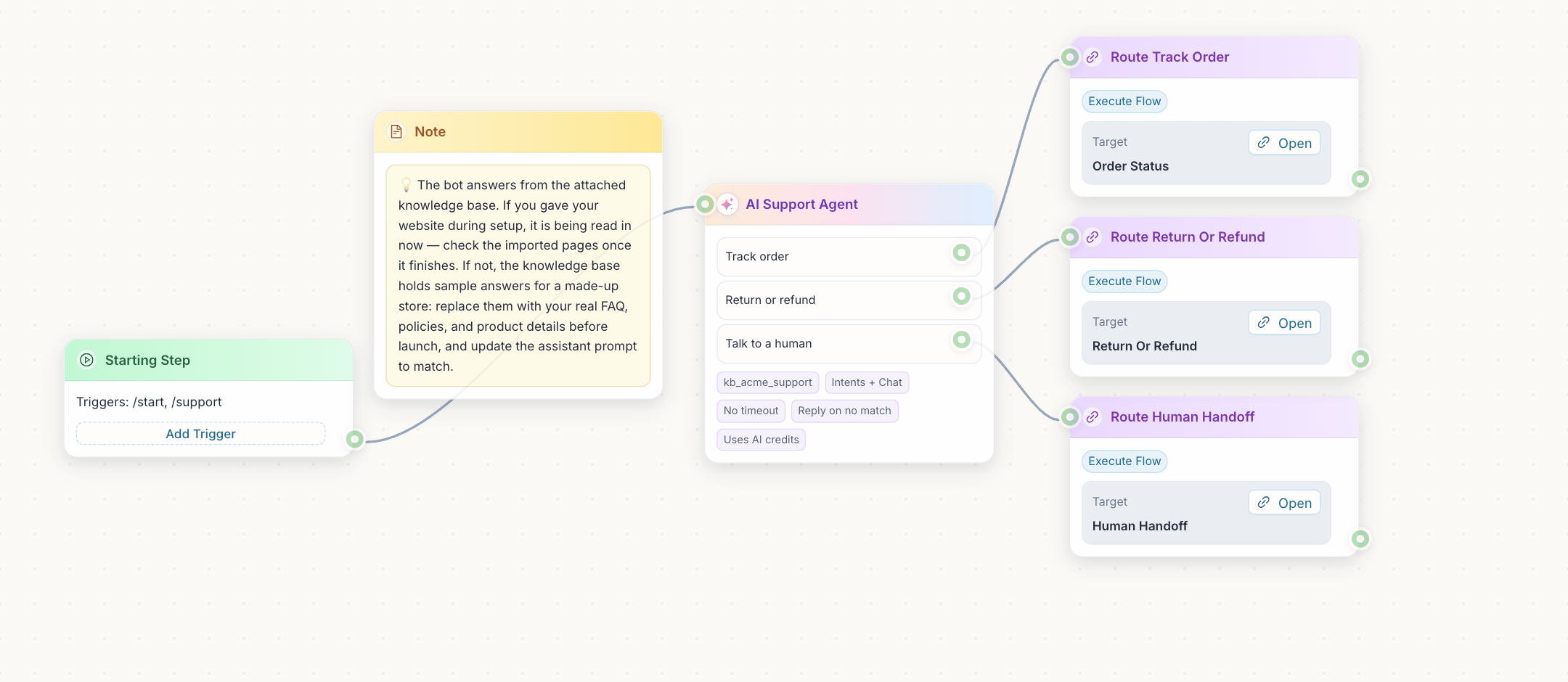
FlowCastle · AI FAQ Assistant + Human Handoff
The FlowCastle editor: a start step, a note, an AI support agent with three intents (track order, return or refund, talk to a human), and three flows it routes to.
The real editor with a ready template; the assistant panel shows what it reports while it builds. Open it in the live editor
  • Messages and buttonsText, images and buttons that lead to the next step.
  • Conditions and variablesBranch on answers, tags and saved data.
  • TimersWait minutes or days, then carry on.
  • AI stepsAn AI agent with intents, or one AI step for one job.
  • HTTP requestsCall any API and use the reply in the next step.
  • Custom codeWrite TypeScript when blocks are not enough. It runs in a sandbox.
  • Payments and modulesTelegram Stars, Stripe, and ready modules like Google Sheets.
  • ReleasesEvery publish is saved, so you can roll back to an earlier release.

No n8n, Make or glue code needed. APIs, webhooks, code, CRM, live chat, AI, payments and hosting are all in one place. Already use n8n or Make for other systems? Connect them with a webhook.

Pricing

Simple pricing. Every feature on every plan.

Every plan includes all product features. Pick the one that fits how many conversations you have each month.

Free

$0/mo

For early usage and small prototypes.

  • About 250 conversations/mo2,000 automation events
  • About 200 AI answers/mo100 AI credits
  • 1,000 broadcast messages/mo
  • The bot’s first message ends with a short line saying it runs on FlowCastle
Get a free setup

Starter

$9/mo

  • About 900 conversations/mo7,500 automation events
  • About 600 AI answers/mo300 AI credits
  • 5,000 broadcast messages/mo
  • No FlowCastle line in the bot’s first message
Get a free setup

Growth

Most common

$29/mo

  • About 6,000 conversations/mo50,000 automation events
  • About 2,000 AI answers/mo1,000 AI credits
  • 30,000 broadcast messages/mo
  • No FlowCastle line in the bot’s first message
Get a free setup

Business

$79/mo

  • About 30,000 conversations/mo250,000 automation events
  • About 6,000 AI answers/mo3,000 AI credits
  • 150,000 broadcast messages/mo
  • No FlowCastle line in the bot’s first message
Get a free setup

Scale

Custom

Custom events, broadcasts and AI credits, for high volume or dedicated infrastructure.

Tell us what you need
  • Every feature on every plan
  • Unlimited contacts
  • Unlimited bots and flows
  • You pay for what customers sendEach message or button tap is one event. The first message is free. A conversation is about 8 events.
  • AI answers use creditsOne answer is half a credit. On paid plans, top up any time: $5 for 250 credits.
  • Save when you pay ahead10% off for 6 months, 20% for a year. Going over a limit never stops your bot.

Get started

Tell us what to automate first.

Show us where your team repeats itself or loses time. We’ll help set up the answers, next steps and follow-ups for your business.

  • An AI agent that uses your business information
  • A clear queue for the work that needs your team
  • Follow-ups with timing and stop rules
Setup is on us

Our team sets up your bot with you, at no cost. No bot yet? We build it with you. Stay on the free plan, or move to a paid plan from $9/month when you need more. We explain usage and AI allowances before we start.

Tell us about your business.

A few details make the first conversation useful.

Which channel do you want to use?

We’ll reply where you prefer.

Prefer to try it yourself? Start free

Questions

What runs on its own, and what do I approve?

The AI agent answers customers, and follow-ups run on the timing and rules you switch on. Reply drafts, task suggestions and bot improvements wait for a person to approve them.

How does AI know who to answer first?

Each time AI reviews a lead, it marks it Urgent, Normal or Low and says why. Urgent means an open problem where waiting costs money or access, like a customer who paid and didn’t get what they bought. If they are upset or have chased you, it ranks higher still. It also reads the funnel step, their orders, the contact data you choose and your own rules in plain words, like “yearly plan clients first”. AI can suggest these rules for you. Urgent leads go to the top of Waiting on us and of the morning digest. Priority only sorts the list: it never sends a message or changes a status.

Can AI use our own business data?

Yes, through the knowledge base and the tools you connect, such as product details, policies or an order lookup. It only has the information you give it.

Which AI models can I use?

You have two options. Use the models we run for you: frontier models such as GPT-6, Claude Opus and Sonnet 5.5, Gemini and Mistral, or Chinese models such as DeepSeek, Qwen and GLM. You pick the model for each AI step, and each one shows its price in AI credits. Or connect your own API key: contact us and our support team sets it up.

Can I start on my own, without the setup?

Yes. Create a free account, describe your bot, and the AI assistant builds it. You can still ask us for the free setup later.

I don’t have a Telegram bot yet. Can I still use this?

Yes. Describe what you need, and the AI assistant builds the bot in FlowCastle. We help you set it up as part of the free setup. You create the bot in Telegram’s BotFather and paste its token, which takes about a minute.

Can it answer on my website as well?

Yes. Add the FlowCastle chat widget to your site with one script. It uses the same flows, AI agent and knowledge base as your Telegram bot, and you can match it to your brand. Website chats join the same Leads queue, and a person can take over from the same inbox. How the website chat works

Does this work with a bot I already have?

We look at your setup first. A bot built with grammY, Telegraf, aiogram or python-telegram-bot can keep its code and add the FlowCastle SDK. You can also build it in FlowCastle or move it from another builder; see Two ways to connect your bot.

Is this for my personal Telegram messages?

This page is about enquiries that come through a Telegram bot you control. Personal accounts need a separate review, and we don’t promise to import your private chats.

Will it change our bot without us knowing?

No. AI review proposes changes and can prepare a draft. You review it, and publishing to your live bot is a separate step.