
Telegram Lead Generation Bot
Every person who writes to your bot leaves a complete, qualified lead — and your team hears about it within seconds, not the next morning.
The problem
Leads that arrive through Telegram get lost in three familiar ways:
- "Hi, how much?" and nothing else. A bare message with no name, no phone and no idea what the person needs. Someone has to write back, wait, and ask again.
- Nobody sees it in time. The message sits in a bot chat or a personal account nobody checks on weekends. By Monday the person has bought elsewhere.
- Every lead looks the same. A student asking out of curiosity and a company ready to pay this week land in one pile, so the hot ones wait in line.
How it works in FlowCastle
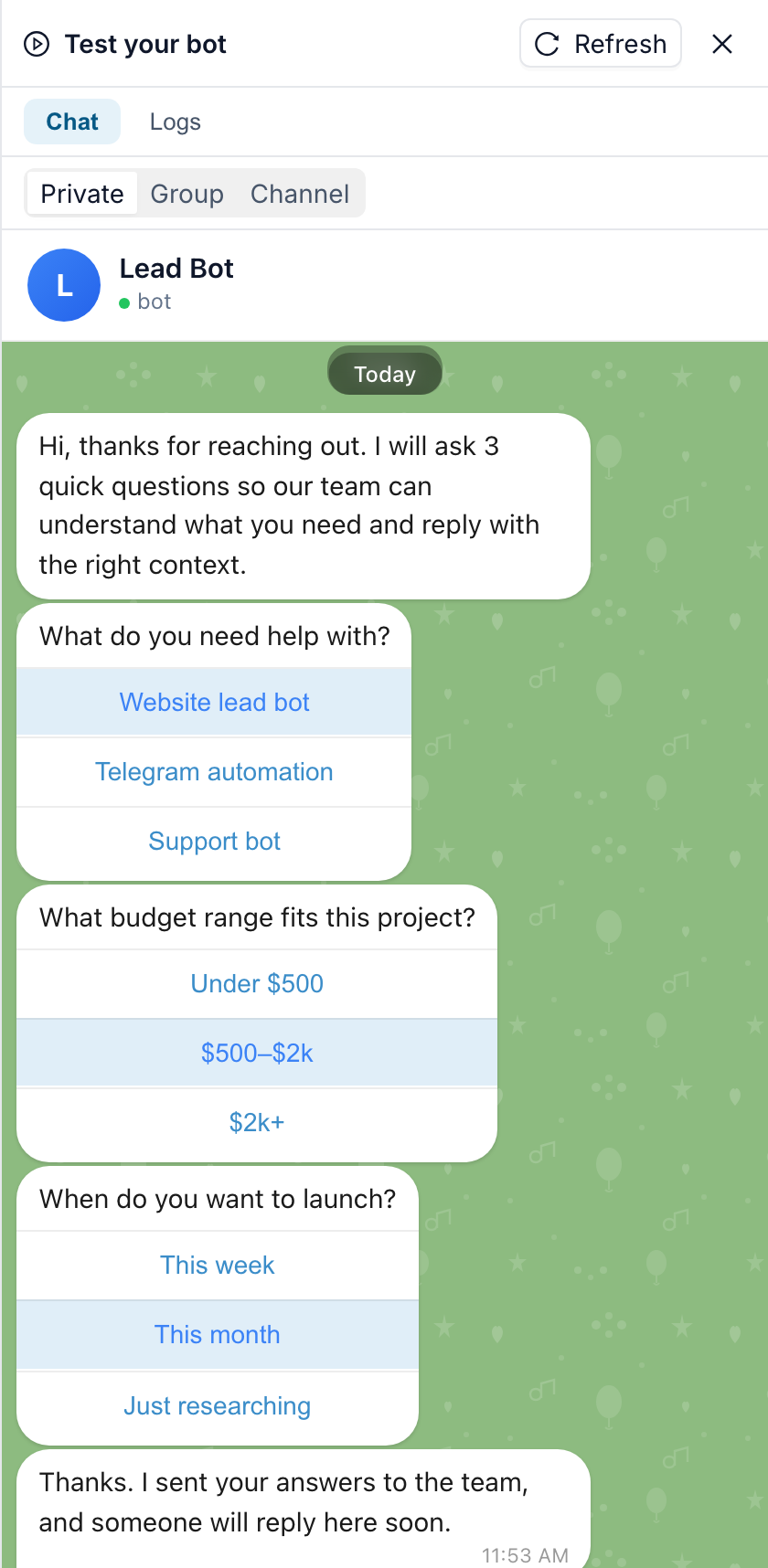
1. The bot asks your questions, with buttons. Instead of an open "how can we help?", the bot asks three short questions — what the person needs, which budget range fits, and when they want to start — and offers answer buttons. Each tap is saved straight onto the contact, so the data stays clean and nobody has to decode free text. Add a step that asks for a phone number: the bot can show Telegram's "share my number" button and checks that a typed number is real before moving on. It can check an email address the same way.

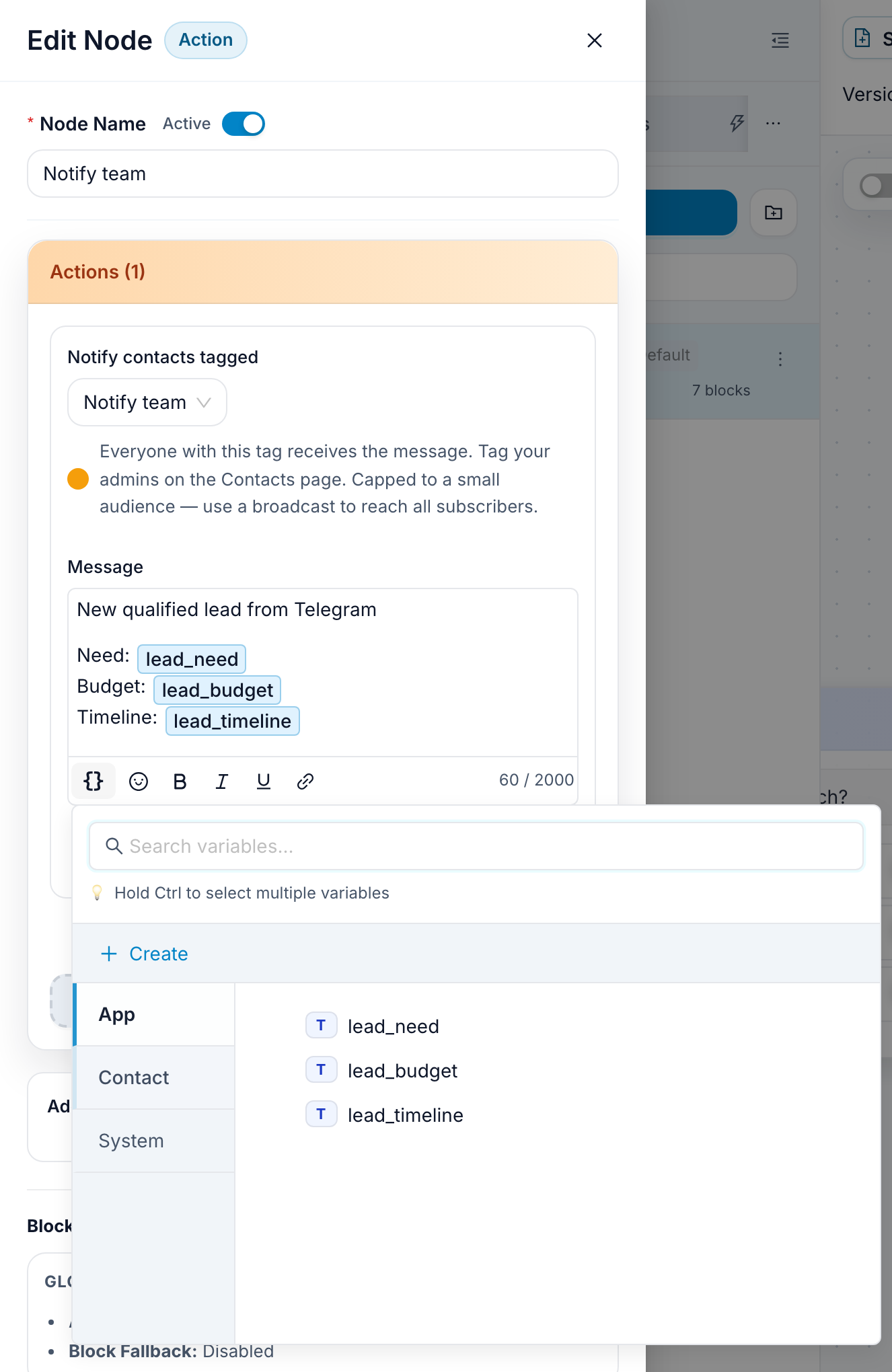
2. Your team is alerted instantly, with the answers attached. When the last answer is in, the bot sends the lead's answers to everyone you tagged as a team member — in Telegram, through your own bot. If you prefer, the alert can go to your team's group chat instead, or through FlowCastle's service bot and email, which works even for teammates who never opened your bot.
3. The person gets an answer, not silence. The bot confirms that the team has the request and will reply in the same chat. When a manager takes over, the conversation can move into the shared live chat inbox with its history, so the reply comes from the same bot the lead already trusts.
Where the leads live afterwards
Every lead becomes a contact with its answers saved on the record. You can filter contacts by those answers, tag the ones you have closed, and see in analytics how many people started the questions and how many finished them.
If you keep leads in a spreadsheet, the Google Sheets module adds an Insert Row step: connect your Google account once, and each finished lead becomes a new row. There is no ready-made amoCRM or HubSpot module yet — message our support and we will add one for your CRM for free. Until then, if your CRM has an API, the bot can send the lead there with an HTTP request step.
Qualify, don't just collect
The template is deliberately simple and linear. Once it works, add one rule that matters: for example, send "$2k+, this week" leads to a manager right away and put "just researching" leads into a short welcome sequence of follow-up messages. The same flow also runs in the web chat widget, so leads from your website land in the same place.
If you take bookings rather than general enquiries, see the appointment booking bot. For a full walkthrough of building this bot step by step, read the lead bot guide.
Templates for this
Frequently asked questions
What does a Telegram lead bot actually collect?
Whatever you ask. The template asks three button questions — what the person needs, their budget range and their timeline — and saves each answer on the contact. You can add a step for the phone number (with Telegram's share-number button) or an email, and the bot checks the format before it moves on.
How do I get notified about a new lead?
The bot messages everyone you tagged as a team member, through your own bot, with the lead's answers in the text. You can also send the alert to a team group chat, or through FlowCastle's service bot and email.
Can leads go to Google Sheets or my CRM?
Google Sheets, yes: the Google Sheets module adds an Insert Row step that writes each lead as a new row. If your CRM has no ready-made module yet, message our support and we will add one for free; until then, a CRM with an API can receive leads through an HTTP request step. Every lead is also stored as a contact inside FlowCastle.
Do I need to write code?
No. Clone the lead qualification template, change the questions and buttons to fit your offer, tag yourself as the team, and publish it to your bot.
Is it free to try?
Yes. There is a free plan and no card is required to build and test a bot.
Build it this week
Start from a template on the free plan. No card required.
Clone the lead bot template