
Website Chat Widget
A website chat widget with an automation engine behind it. It learns your site in minutes, and when a visitor asks something that needs a real answer — where is my order, is my account still active, can I book Thursday — the flow calls your system and tells them, instead of promising that someone will get back to them.
Most website chats can only talk
Every chat widget on the market can answer questions. Point it at your website, it reads your pages, and it handles "what are your hours" forever. That is genuinely useful, and it is also where most of them stop.
The moment a visitor asks something only your system knows — where their order is, whether their subscription renewed, if Thursday at four is free — the chat has nothing to say. It collects an email and promises a human will follow up. The visitor waits. Often they just leave.
Tidio, whose flow builder is one of the better ones, says it plainly in their own FAQ: their flows handle "simple tasks" and "simple transactions that don't involve a lot of variables." That is an honest description of what a rule tree can do.
FlowCastle's widget is the front door to a real automation engine. The same builder that runs Telegram bots handling payments, subscriptions and multi-day sequences runs the chat on your website.
Three things it can do that a rule tree cannot
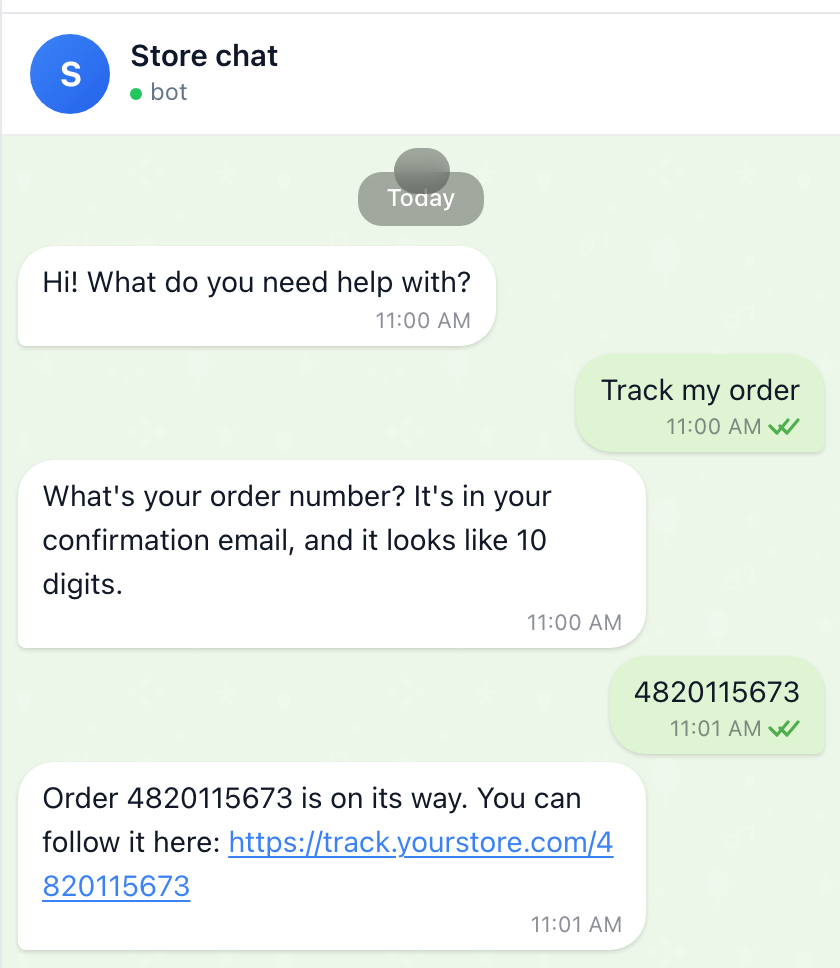
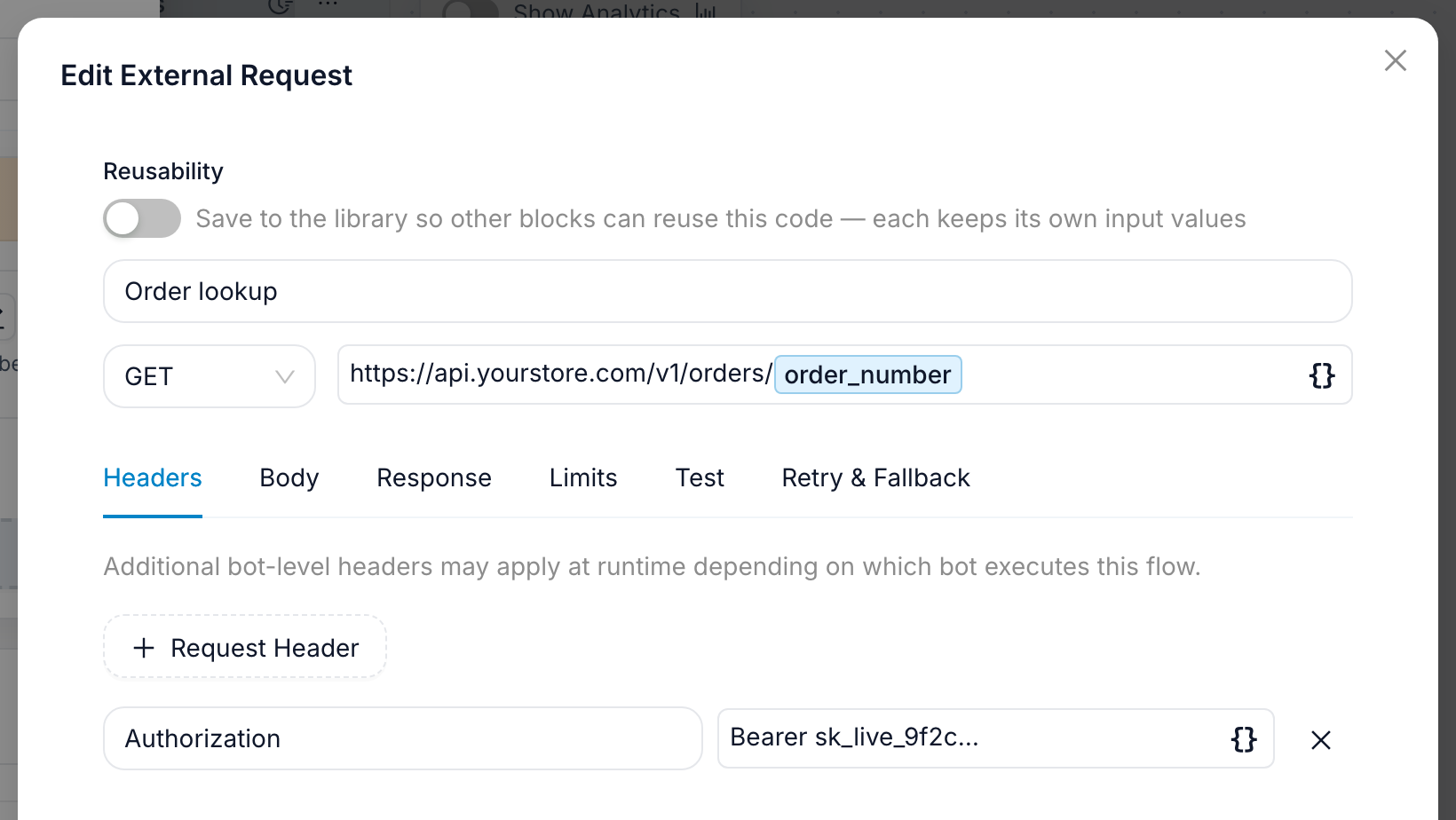
Check an order. The visitor asks about their order. The flow asks for the order number, sends an HTTP request to your API, branches on what comes back — shipped, delayed, not found — and answers with the tracking link. If the number is wrong, it asks again instead of dead-ending.
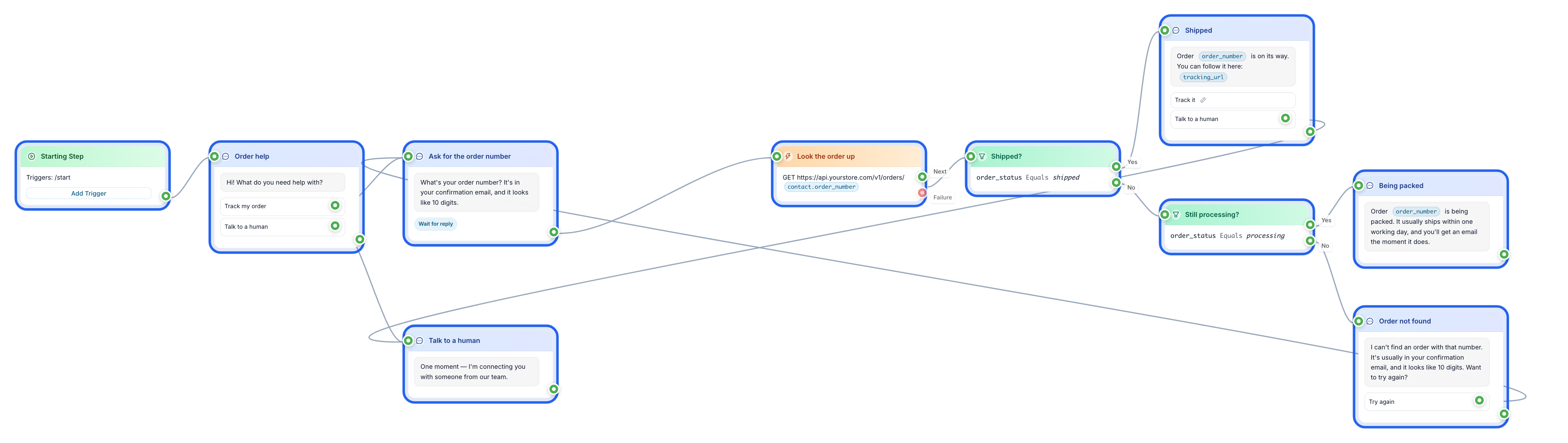
Verify an account. Someone asks whether their subscription is still active. The flow asks for their email, calls your billing system, and answers with the real date. If the account expired, it can send the renewal link and tag the contact so a follow-up message goes out in three days if they still have not renewed.
Book a slot. The visitor wants an appointment. The flow reads your calendar API, offers the free times as buttons, writes the booking back, confirms it, and schedules a reminder for the day before.
None of these are integrations you buy separately. They are nodes on the same canvas as your messages: an HTTP request, a condition, a variable, a wait. If your API needs something unusual, drop in a TypeScript block — or describe it in plain words and let the AI assistant write it for you.
It still answers the easy questions
The predictable half of your inbox does not need any of that.
Point the knowledge base at your website and it reads your pages, so the widget can answer what you do, what it costs, how to get started, and what your refund policy is — on its own, in the visitor's language, from your own words rather than invented ones. The website import takes a URL and a few minutes.
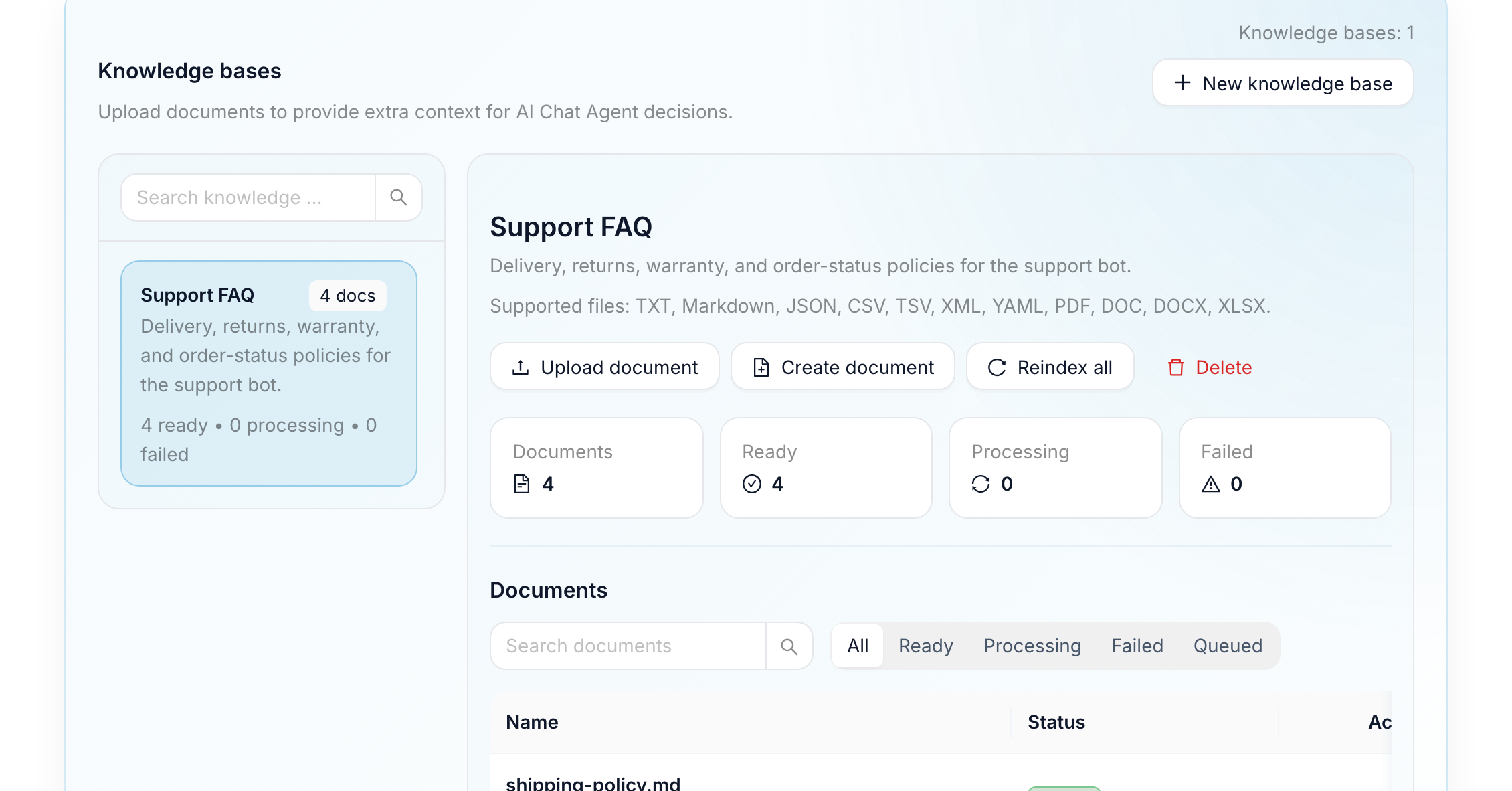
Because AI and deterministic logic live in the same flow, you decide which questions get which treatment. Common questions become buttons that answer instantly. Anything else goes to the AI. Anything that needs a person goes to a person.
Priced per interaction, not per conversation
This is where the pricing model differs, and it is worth understanding before you compare price tags.
Most website chat tools bill the conversation. In Tidio's Starter plan, $24.17 a month buys 100 billable conversations — and a visitor tapping a button to read your refund policy spends one of them exactly like a hard question does. Chatbase bills message credits: 50 a month free, 700 on the $40 Hobby plan, $40 per thousand after that.
FlowCastle bills the interaction: one automation event each time someone wakes your bot with a message or a button tap. Nothing the bot does in response is counted — replies, menus, conditions, requests to your own API, custom code and waits are all free — and each person's first-ever message is never counted at all. Contacts are unlimited.
That shape matters more than the headline price. The free plan includes 2,000 automation events a month, which at a realistic eight visitor turns per conversation is roughly 250 conversations before you pay anything, against Tidio's 50. Starter is $9 for 7,500 events — roughly 900 conversations, against Tidio's 100 at $24.17. And because the work inside a flow is free, the more of your chat you turn into buttons and lookups, the cheaper it gets.
AI is billed separately, in credits. A fast model costs half a credit per answer — about a cent, against the four cents a credit Chatbase publishes. Every workspace includes 100 credits a month, roughly 200 answers on a fast model, and today that allowance is the same on every plan. If your site needs more there are two routes, both arranged with our support team rather than switched on in the dashboard: top up at $5 per 250 credits, or run the AI on your own LLM provider key, so those answers bill to your provider account instead of your credits. Worth knowing before you plan around it.
You find out what actually happened
A chat widget that reports "247 conversations this month" has told you nothing you can act on.
Every flow in FlowCastle is a funnel. You see how many visitors entered, how far each one got, and exactly which step they abandoned — the question nobody answers, the menu nobody taps, the lookup that keeps failing. Goals let you mark what counts as success, and conversion is broken down by where the visitor came from.
On top of that sits Pulse, which reads the actual conversations. It flags the questions your bot could not answer, the dead ends people hit, and the contacts who went quiet mid-flow — and it drafts the fix, so the next version of the flow is a review rather than an archaeology project.
Adding it to your site
No token, no approval. A Telegram bot needs a token from BotFather. A web chat bot needs nothing: add a bot, choose Web Chat, and it exists. You can have a working widget before you have decided on a name.
Three ways to embed it. One script tag before </body> puts a bubble in the corner of every page. An iframe snippet drops the chat into a specific spot on a specific page. And every web chat bot gets its own full-screen URL you can link to or hide behind a QR code — that page installs as a web app, so a visitor can keep it on a phone home screen and get push notifications. The embed guide has the exact snippets.
What visitors can do. Tap buttons and menus, including multi-select and confirmations. See images, open documents, download files the flow sends. Upload their own photos and files up to 50 MB. Watch a typing indicator while the bot works. Come back on Thursday and find Monday's conversation still there — returning visitors are recognised in their browser, so nothing restarts from the welcome message.
Make it yours. Light, dark, or follow the system. Accent colour, bubble colours, chat background including an image. Your avatar, favicon and header. Panel width and corner radius. A welcome message that sends itself on first open, and a dismissible notice under the header. There is a setting for whether the chat opens itself when the bot replies or just shows an unread badge. On any paid plan the "powered by" footer comes off.
Your own domain. By default the widget loads from FlowCastle. To serve it from chat.yourcompany.com, add the subdomain, create the CNAME record we show you, and we issue the TLS certificate — usually quickly, occasionally up to 24 hours. Subdomains only; an apex domain like yourcompany.com cannot be used.
When a person needs to take over
Bot conversations become inbox conversations. When a visitor asks something the flow was not built for, or simply asks for a human, the flow hands the conversation over and your team answers from the live chat inbox — the same inbox that holds your Telegram conversations. The visitor stays in the same window and never learns they crossed a boundary.
The chat widget on this website runs on FlowCastle, from a template you can install and read: Website Chat Assistant.
One audience, however they arrived
A web chat visitor becomes a contact, which means the rest of the platform applies with no special handling: tags and variables, drip sequences, broadcasts, goals and conversion reporting, the funnel that shows where people stop. The same flow also runs in Telegram, over email, and through MTProto — build it once, change the welcome message once, and every channel changes.
What it does not do
Worth knowing before you build around it:
- Payments do not run in web chat. Telegram Payments works in Telegram. A flow with a payment step will not take money from a website visitor — send them to your existing checkout instead.
- There is no JavaScript API for identifying a logged-in visitor yet. If you want the flow to know who someone is, it has to ask them in the conversation. That works, but it is a question rather than a greeting by name.
- No behaviour triggers. The widget cannot open itself after 30 seconds, on exit intent, or on a particular URL.
- No WordPress or Shopify plugin. It is a script tag, which works on both, but there is no listing in either directory.
- The floating bubble sits in the bottom-right corner. That position is not configurable yet.
- Telegram Mini App buttons are Telegram-only. The widget ignores them.
- Widget chrome is English or Russian. Your own messages can be in any language; the interface labels around them cannot yet.
We would rather you read that here than discover it in production.
Start with the question your chat cannot answer today
Pick the thing visitors ask that your current chat has to escalate — the order, the account, the booking. That is one HTTP request and one condition away from being answered in the conversation. The free plan needs no credit card and no token.
FAQ
How is this different from Tidio or Chatbase?
Those tools answer questions well. This one also completes tasks: the flow can call your API, branch on the response, run code, wait days, and hand off to a human — so a visitor asking where their order is gets the actual answer instead of a promise that someone will email them. Tidio's own FAQ describes their flows as handling "simple tasks" and "simple transactions that don't involve a lot of variables."
Do I pay per conversation?
No — you pay per interaction. One automation event is counted each time someone messages the bot or taps a button; everything the bot does in response is free, including replies, conditions, API calls and custom code. Each person's first message is free and contacts are unlimited. The free plan includes 2,000 events a month, roughly 250 conversations. AI is billed separately: 100 credits a month included, about 200 answers on a fast model. Beyond that you can top up, or ask us to run the AI on your own LLM provider key.
Does it need a Telegram bot?
No. Web chat needs no BotFather token and no approval — add a bot, choose Web Chat, and it exists. If you also run a Telegram bot, the same flow serves both channels and both audiences land in the same contact list and the same inbox.
Can it answer from my website content?
Yes. Point the knowledge base at your site and it reads your pages, so the widget answers from your own words rather than invented ones. Predictable questions can be buttons that cost no AI at all; everything else goes to the AI node.
Can a human take over the conversation?
Yes. The flow can hand any conversation to your team, who answer from the live chat inbox — the same inbox that holds Telegram conversations. The visitor stays in the same chat window.
Can visitors pay inside the chat widget?
No. Telegram Payments works in Telegram only; a payment step in a flow will not take money from a website visitor. Send them to your existing checkout instead.