
Telegram Shop Bot
Sell a product in the same chat where the customer asked about it — show it, take the payment, and deliver it without sending anyone to another site.
The problem
Selling through Telegram by hand usually stalls in the same places:
- "Send me the payment details." Every sale turns into a back-and-forth about card numbers and screenshots of transfers, and you check each payment yourself.
- You are the checkout. Orders wait until you are awake and online, so a buyer at 2 a.m. becomes a buyer who forgot by morning.
- Delivery is manual too. After the money arrives someone still has to find the file, the link or the access and send it — and remember who has already got it.
How it works in FlowCastle
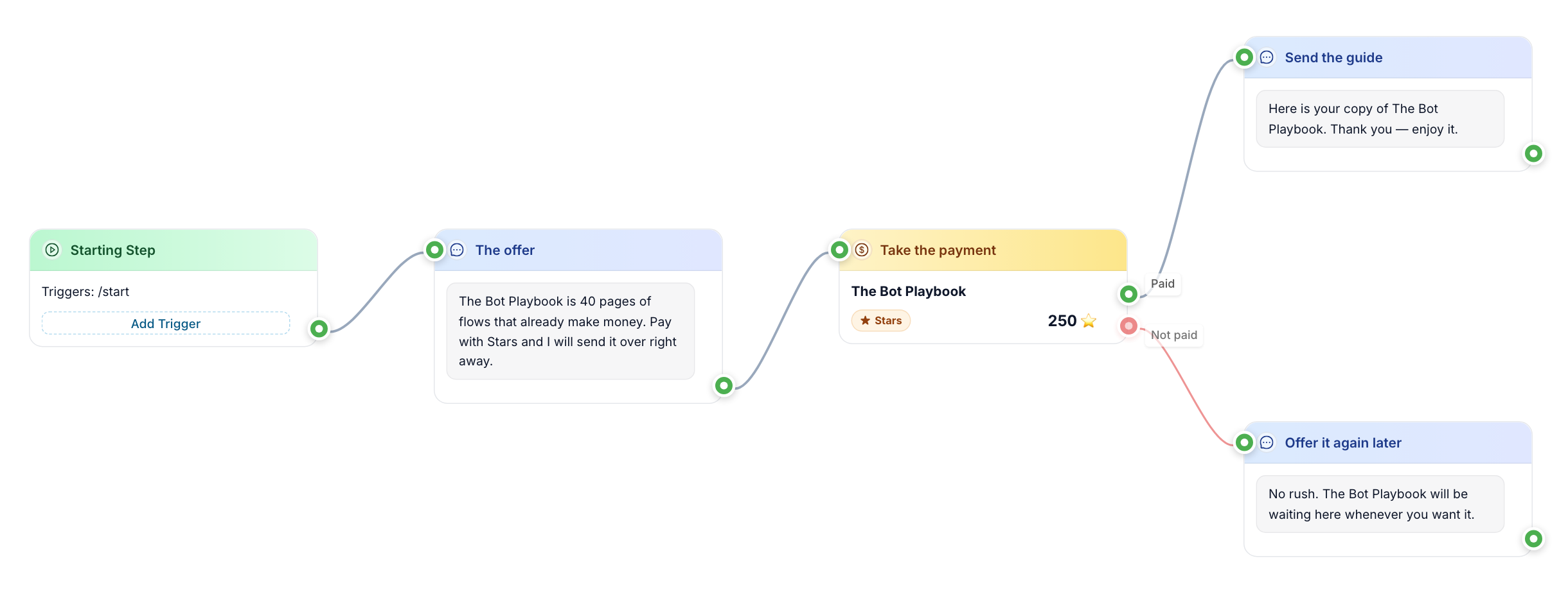
A shop bot in FlowCastle is a flow: product messages with buttons, a payment step, and what happens after payment. There are three ways to take the money.
1. Telegram Stars — nothing to set up. Add a payment block, set the price in Stars, and the bot sends a Telegram invoice. The buyer pays inside Telegram without typing card details. The flow has two exits: "paid" continues to delivery, "not paid" lets the buyer try again, and nothing is charged. No keys, no provider, no webhooks — a connected bot is all you need. Stars suit digital goods: guides, files, access.
2. Card payments inside Telegram. The same block can charge in regular currency. Connect a payment provider to your bot in @BotFather (Payments section), paste the provider token into your bot's settings in FlowCastle, and switch the block to card. The step-by-step setup is in the payments guide.
3. Stripe checkout. The Stripe product-sales template shows your products, asks for the buyer's email for the receipt, creates a Stripe checkout and sends an "Open checkout" button. When Stripe reports the payment, a second flow checks that it is really paid, thanks the buyer and alerts your staff to deliver the order. Payments that are not confirmed are recorded, never announced as paid. Your Stripe secret key goes into the module settings, not into the chat.
After the payment
By default the templates hand delivery to a person: the buyer gets a thank-you and your team gets a sale alert in Telegram. For digital products you can deliver instantly instead — the Stars template ends with an "Open your product" button pointing at your download link, and tags the buyer as a customer so you can find them later.
Every buyer is a contact with a history, so analytics can count a completed payment as a goal and show which flow or campaign produced it.
Already have an online store?
If you sell on your own website, the abandoned checkout template helps from the Telegram side: your store sends an "abandoned cart" event, the bot waits (an hour by default), then sends a reminder with a discount code or a button to ask a question. If the store reports that checkout was completed in the meantime, the reminder is skipped. It needs your store to send these events to the bot, and the shopper must be a contact of your bot.
What to keep in mind
- The price on a payment block is fixed, so each product with its own price gets its own payment step.
- There is no multi-item cart in the templates: the buyer picks one product and pays for it. For digital goods, courses and single items that is enough.
Selling a subscription to a closed channel rather than a product? See the paid channel subscription bot. Taking enquiries before a sale? Start with the lead bot.
Templates for this
Frequently asked questions
Which payment methods can a Telegram shop bot accept?
Telegram Stars with no setup at all; card payments inside Telegram through a provider you connect in @BotFather; and Stripe checkout through the Stripe module. The product-sales template also has a YooKassa option.
Does the buyer have to leave Telegram?
Not with Stars or card payments inside Telegram — the invoice opens in the chat. With Stripe, the buyer taps a button that opens Stripe's checkout page, then comes back to the bot.
How is the product delivered?
By default your team gets a sale alert and delivers the order. For digital goods the bot can deliver right after payment — for example a button with the download link, as in the Stars template.
Is there a catalogue with a shopping cart?
Not as a ready template. The shop templates sell through product messages with buttons: the buyer picks one product and pays for it. That covers digital goods, courses and single items well.
Is it free to try?
Yes. There is a free plan and no card is required to build and test a bot.
Build it this week
Start from a template on the free plan. No card required.
Clone the Stars shop template