
Telegram Broadcasts
A broadcast is a message your bot sends to many subscribers at once: a new product, an event reminder, a discount. In FlowCastle you pick who gets it, test it on yourself, send it now or on a schedule, and then see what people did after they got it.
More than one message
A broadcast in FlowCastle is a small flow, built in the same editor as the rest of your bot. It can be one text, or a few steps:
- text with a photo, video or file;
- buttons: a link to your site, or a button that continues the conversation ("Show me the offer", "Remind me tomorrow");
- actions after a tap: add a tag, save an answer, mark a goal such as "clicked the offer".
Messages can use the subscriber's first name and any data the bot has saved about them. The AI assistant can draft the broadcast for you from a short description.
Choose who gets it
Open Select recipients and add conditions. A broadcast goes only to contacts that match. You can filter by:
- Tags, for example everyone tagged
viporwebinar-sept. - Answers the bot saved, like city, budget or product interest.
- Language and subscription date, for example "joined in the last 7 days".
- Goals: people who paid, or who never finished checkout. A goal condition can be "ever" or "within the last N hours or days".
Combine conditions with "all must match" or "any can match". The panel shows how many people match before you send. If you run several bots in one workspace, choose one bot, a few, or all of them.
Test, then send now or on a schedule
Two ways to check a broadcast first:
- Test chat runs it in a preview chat. Nobody real gets anything.
- Send test sends it for real to up to 5 contacts you pick, for example yourself and a colleague. The audience and the stats are not touched.
Then click Send Now, or Schedule a date and time. Turn on Make it recurring for a send that repeats: every few minutes or hours, daily, on chosen weekdays, weekly, monthly or twice a month, with an optional end date. A recurring broadcast can be paused, resumed or cancelled. A running send can be stopped: people who already got it keep the message, nobody else gets it.
FlowCastle sends in small batches, about ten people a second, so a large list doesn't hit Telegram's limits all at once.
See what the broadcast actually did
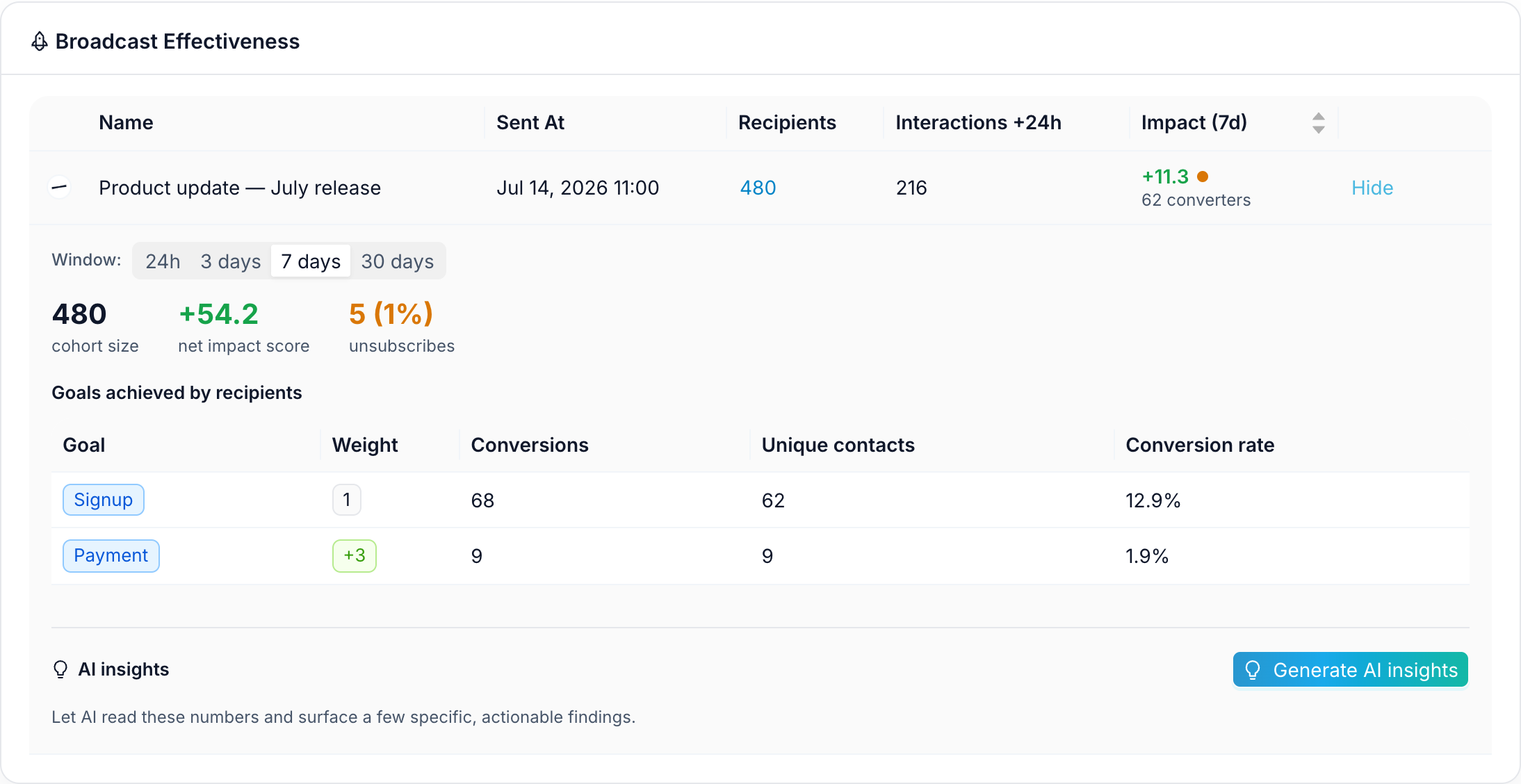
Each broadcast shows how many messages were sent. Analytics → Broadcasts goes further: how many people interacted within 24 hours, how many unsubscribed, and which goals recipients reached in the next 24 hours, 3, 7 or 30 days.
So you can compare two broadcasts by payments, not by how many messages went out. The analytics page explains goals in more detail, and this article shows the full setup.
Automatic follow-ups for new subscribers
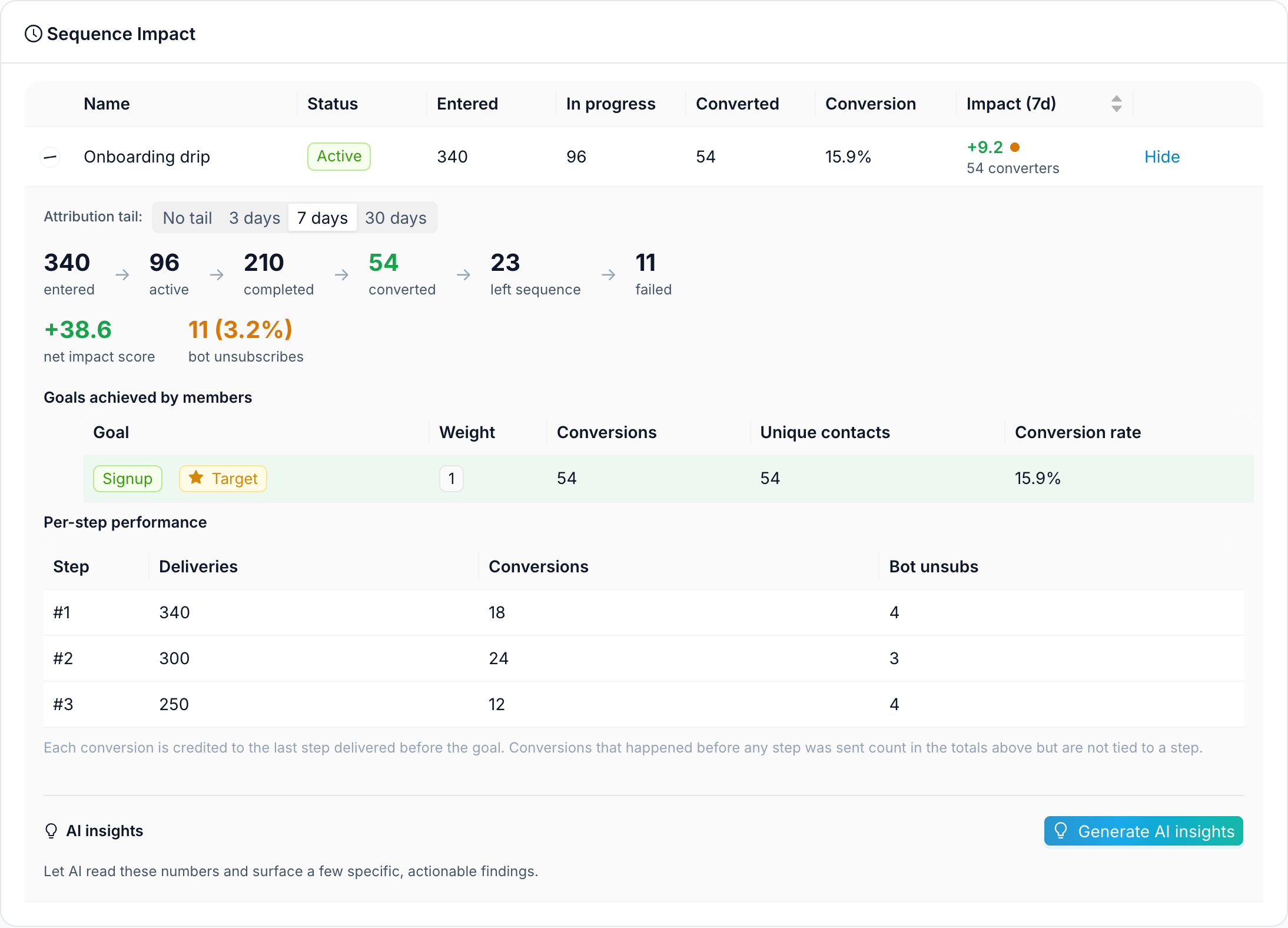
A broadcast goes to your list at one moment. A sequence goes to each person on their own timeline: a step 1 hour after they subscribe, then after 1 day, 3 days, and so on. Each step is a message or a whole flow. You can set a target goal: when someone reaches it, for example pays, they leave the sequence and stop getting reminders. Analytics shows which step people converted after.
To start fast, clone the Welcome Drip Sequence template: tips after 1 hour, 1 day, 3 days and 7 days, with a one-tap "Stop the tips" button.
The Telegram rule: only people who started your bot
A Telegram bot can only message people who opened it and pressed Start. You can't upload a list of phone numbers or message your channel's subscribers through the bot. People who blocked the bot don't get the broadcast.
So the list is built by the bot itself: a lead form, a free guide, a quiz, a "remind me" button. Every person who starts the bot becomes a contact you can reach later. Good starting points: a lead bot or a survey or quiz bot.
FAQ
Can a bot send a broadcast to people who never started it?
No. This is a Telegram rule: a bot can only message people who opened it and pressed Start. You can't import phone numbers or message your channel's subscribers through the bot. Grow the list with the bot itself, for example with a lead form, a free guide or a quiz.
Can I send a broadcast only to some subscribers?
Yes. Add conditions in Select recipients: tags, answers the bot saved, language, subscription date, or goals such as paid or did not finish checkout. The panel shows how many people match before you send.
Can I schedule a broadcast or make it repeat?
Yes. Pick a date and time, or turn on Make it recurring: every few minutes or hours, daily, on chosen weekdays, weekly, monthly or twice a month, with an optional end date. You can pause, resume or cancel it.
How do I know if a broadcast worked?
Analytics → Broadcasts shows interactions and unsubscribes within 24 hours, and which goals recipients reached within 24 hours, 3, 7 or 30 days, with a conversion rate for each goal.
Will a big broadcast get my bot blocked by Telegram?
FlowCastle sends in small batches, about ten people a second, so a large list doesn't hit Telegram's limits all at once.
Is it free?
Yes, there is a free plan, and it includes a monthly allowance of broadcast messages.