
Writing bot code is fun. Then the bot gets real users, and the questions change: who is actually talking to it? Which conversations end in a sale? Can support take over a chat when the bot gets stuck? Can we message everyone who dropped off before paying?
None of that is bot logic, and none of it belongs in your handlers. It's the layer around a bot — and every tool that offers it wants your bot token and wants to host the bot for you, which means throwing away the code you wrote.
This article shows the third option: keep your grammY, Telegraf, aiogram or python-telegram-bot bot exactly where it is, and add that layer with an open-source middleware. By the end you'll have a contact record for every user, goals showing up in funnels, a /human command that hands the chat to a person, and — optionally — flows your teammates build visually that run through your bot process. The full example bot is linked at the end; it exists for all four frameworks.
What you'll add, and what stays yours
| Stays in your code | Added by FlowCastle |
|---|---|
| Your framework, handlers, database, hosting | Contact CRM with traits, tags and history |
| Your Telegram bot token — FlowCastle never receives it | Live Chat: a person replies in the same Telegram chat, through your bot |
| Polling or webhooks, exactly as today | Broadcasts and drip sequences, sent through your bot |
| Anything you'd rather keep in source control | Goals, funnels, conversion analytics |
| A read-only map of the conversations your code already handles |
The SDK is MIT-licensed, lives on GitHub, has zero runtime dependencies on Node and uses only the standard library on Python. The hosted part is the FlowCastle dashboard, which has a free plan with no card required.
Step 1: Create the SDK key
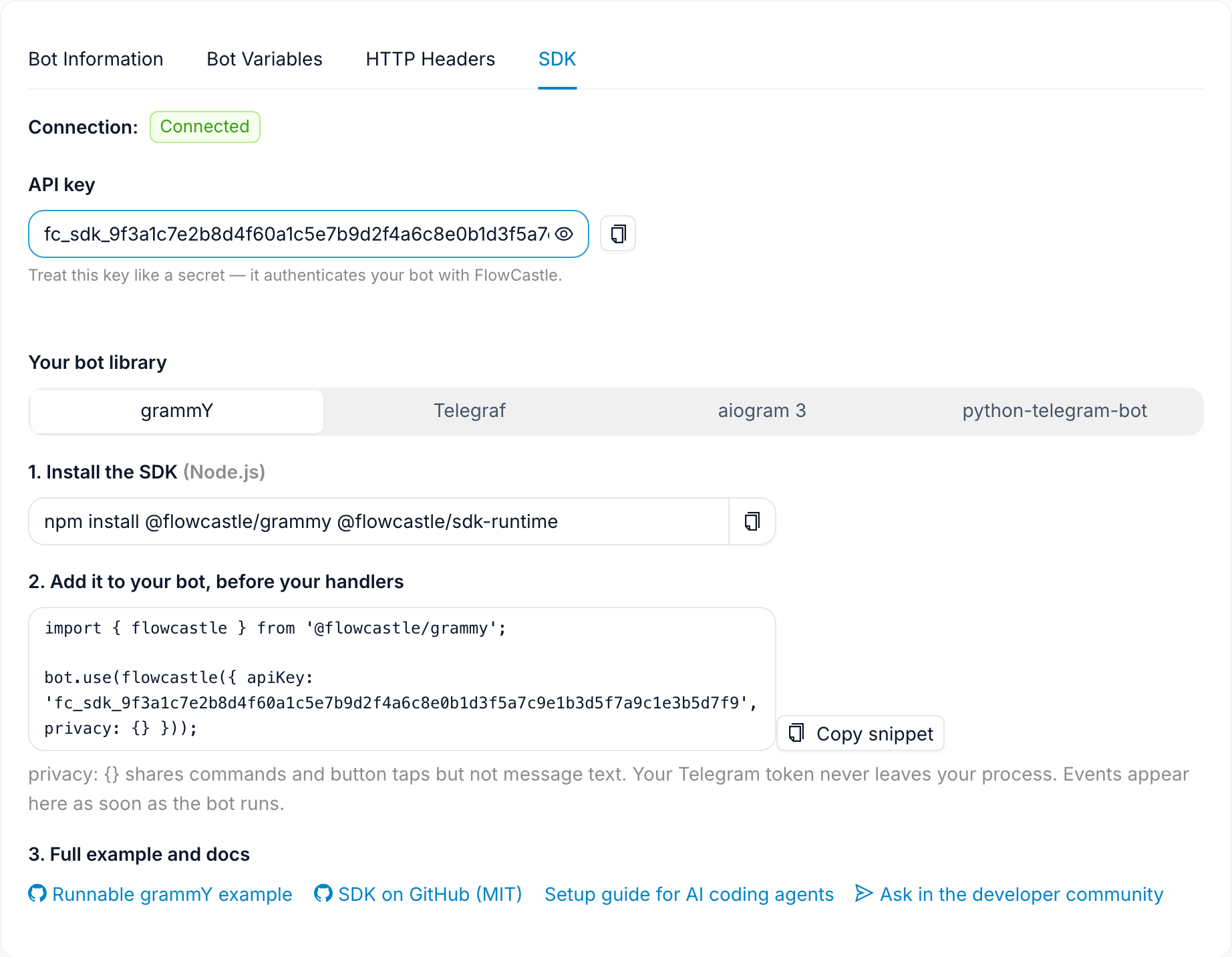
In the FlowCastle dashboard, open your application and click Add bot. Pick Code SDK.
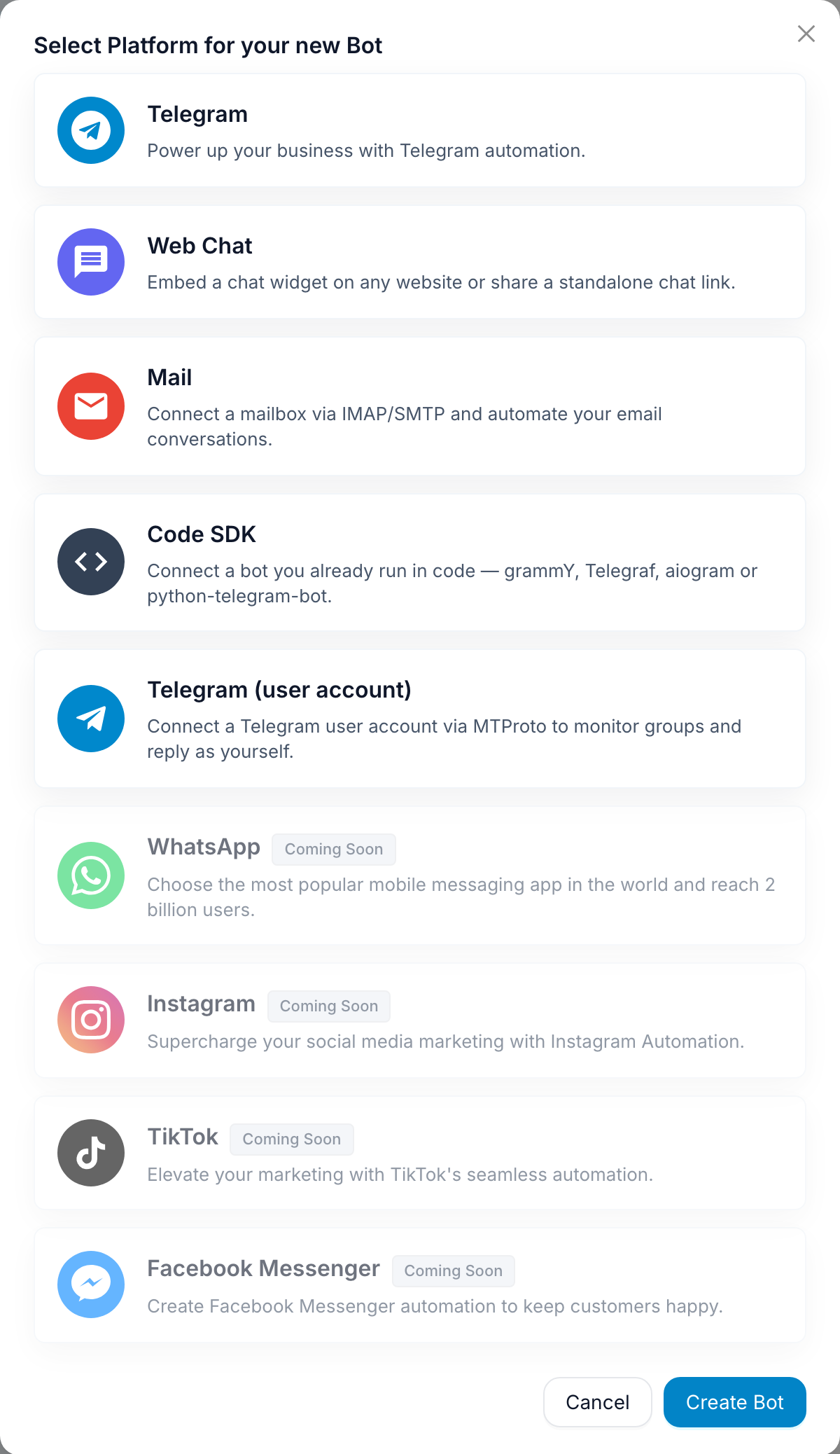
Notice what it doesn't ask for: a Telegram token. Give the connection a name and create it. You get an fc_sdk_… key, and the install instructions for your library.
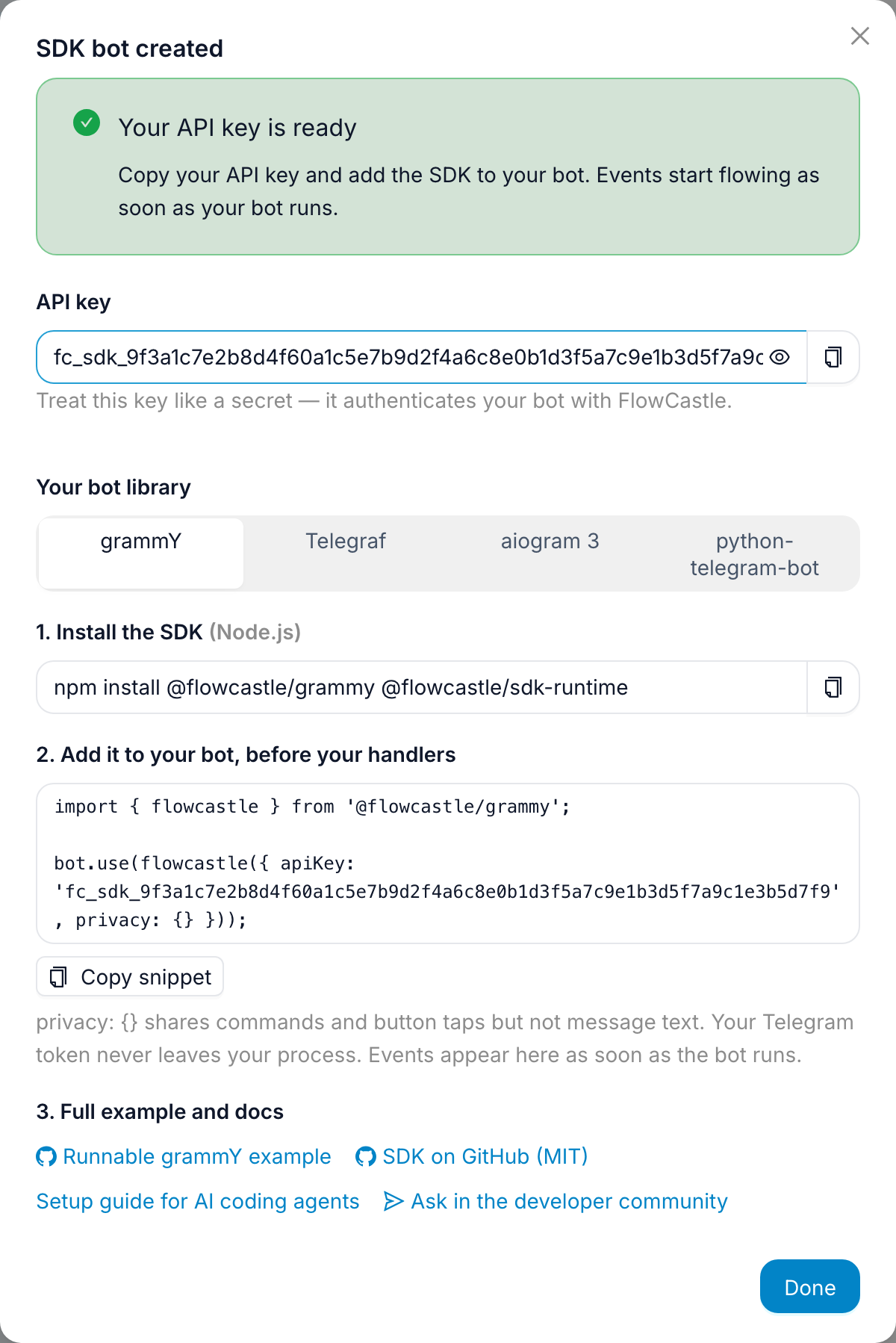
Switch the picker and the instructions follow — here's the same screen for aiogram:
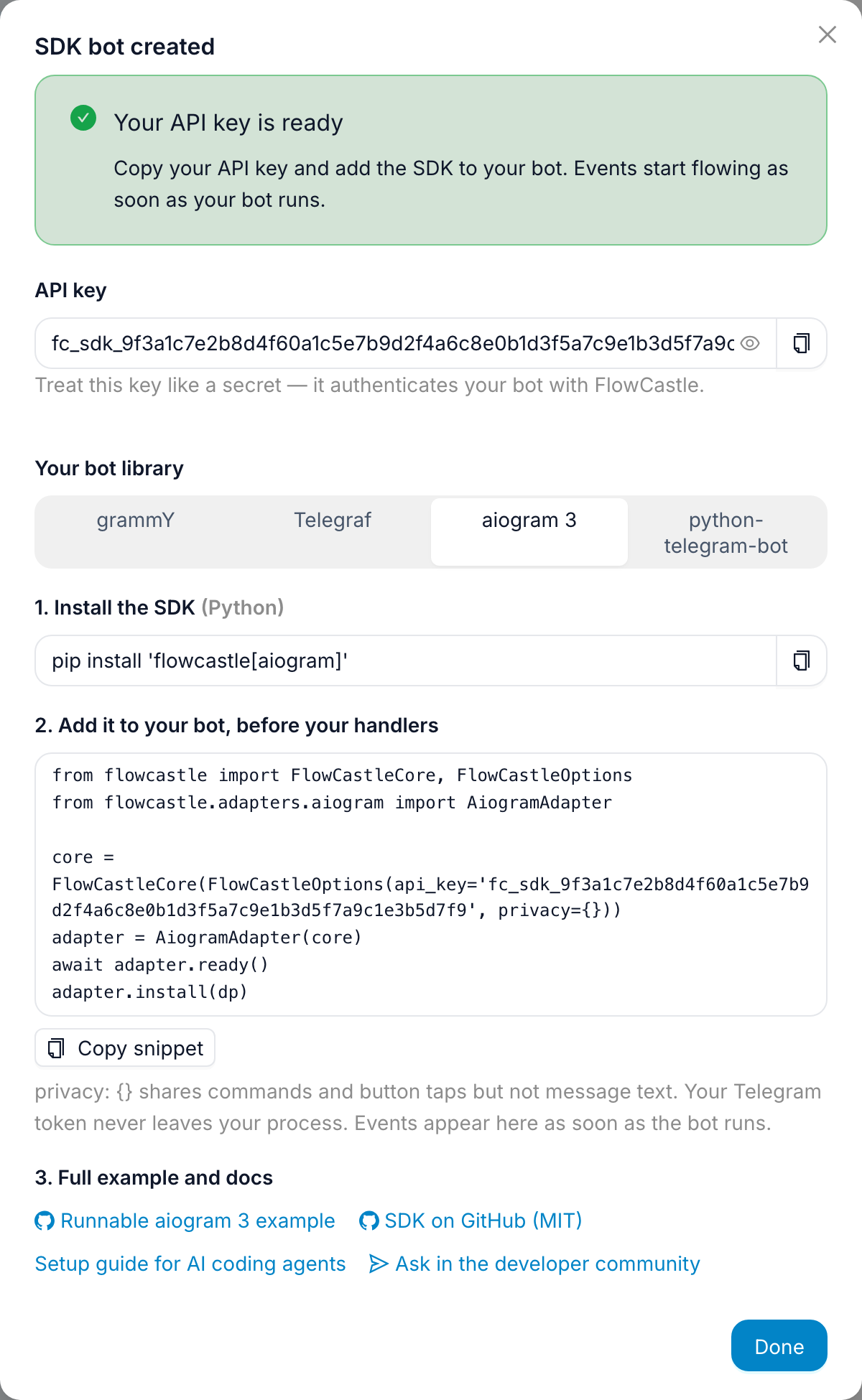
Put the key next to your existing BOT_TOKEN as FLOWCASTLE_API_KEY. Treat it like a secret — it's how your bot authenticates with FlowCastle.
Step 2: Add the middleware (three lines)
grammY:
import { Bot, Context } from 'grammy';
import { flowcastle, FlowCastleFlavor } from '@flowcastle/grammy';

type BotContext = FlowCastleFlavor<Context>;
const bot = new Bot<BotContext>(process.env.BOT_TOKEN!);

const fc = flowcastle<BotContext>({
  apiKey: process.env.FLOWCASTLE_API_KEY!,
  privacy: {},                 // commands and button taps are shared, free text is not
  runtime: { enabled: true },  // lets visually built flows run through this bot (Step 6)
});
bot.use(fc);                   // before your handlers, so it sees every update

// ...your existing handlers, unchanged...

await fc.ready();
bot.start();
aiogram 3:
from flowcastle import FlowCastleCore, FlowCastleOptions
from flowcastle.adapters.aiogram import AiogramAdapter

core = FlowCastleCore(FlowCastleOptions(api_key=os.environ["FLOWCASTLE_API_KEY"], privacy={}, runtime_enabled=True))
adapter = AiogramAdapter(core)

await adapter.ready()
adapter.install(dp)          # outer middleware; handlers get `flowcastle` in their data
await dp.start_polling(bot)
Telegraf and python-telegram-bot are the same shape; the README has all four.
Two things about that snippet worth knowing before you run it.
privacy: {} is a choice you're making explicitly. With it, the SDK sends commands and callback identifiers but strips free text before anything leaves your process. Contacts get a Telegram user id and nothing else unless you allow specific profile fields (contactFields: ['username', 'languageCode']). If your FlowCastle flows need to read what users type — say, for AI answers — set messageContent: 'full' and, if you want, a transformText callback that redacts emails or card numbers locally. A callback that throws or times out drops the field rather than sending it unredacted.
Your handlers never wait on FlowCastle. After local filtering, the event goes into a bounded in-memory queue (500 events, oldest dropped under pressure) and your handler runs immediately. Delivery is batched every three seconds with one background retry. If FlowCastle is unreachable, your bot loses some analytics, not its users.
Run the bot and send it /start. Back in the dashboard, the bot's SDK tab flips to Connected, and the person who sent /start is now a contact.
That's the whole integration. Everything below is about using it.
Step 3: Turn your handlers into a CRM
The middleware puts a small API on the context — ctx.flowcastle in Node, the flowcastle argument (aiogram) or context.flowcastle (python-telegram-bot) in Python. Three calls do most of the work.
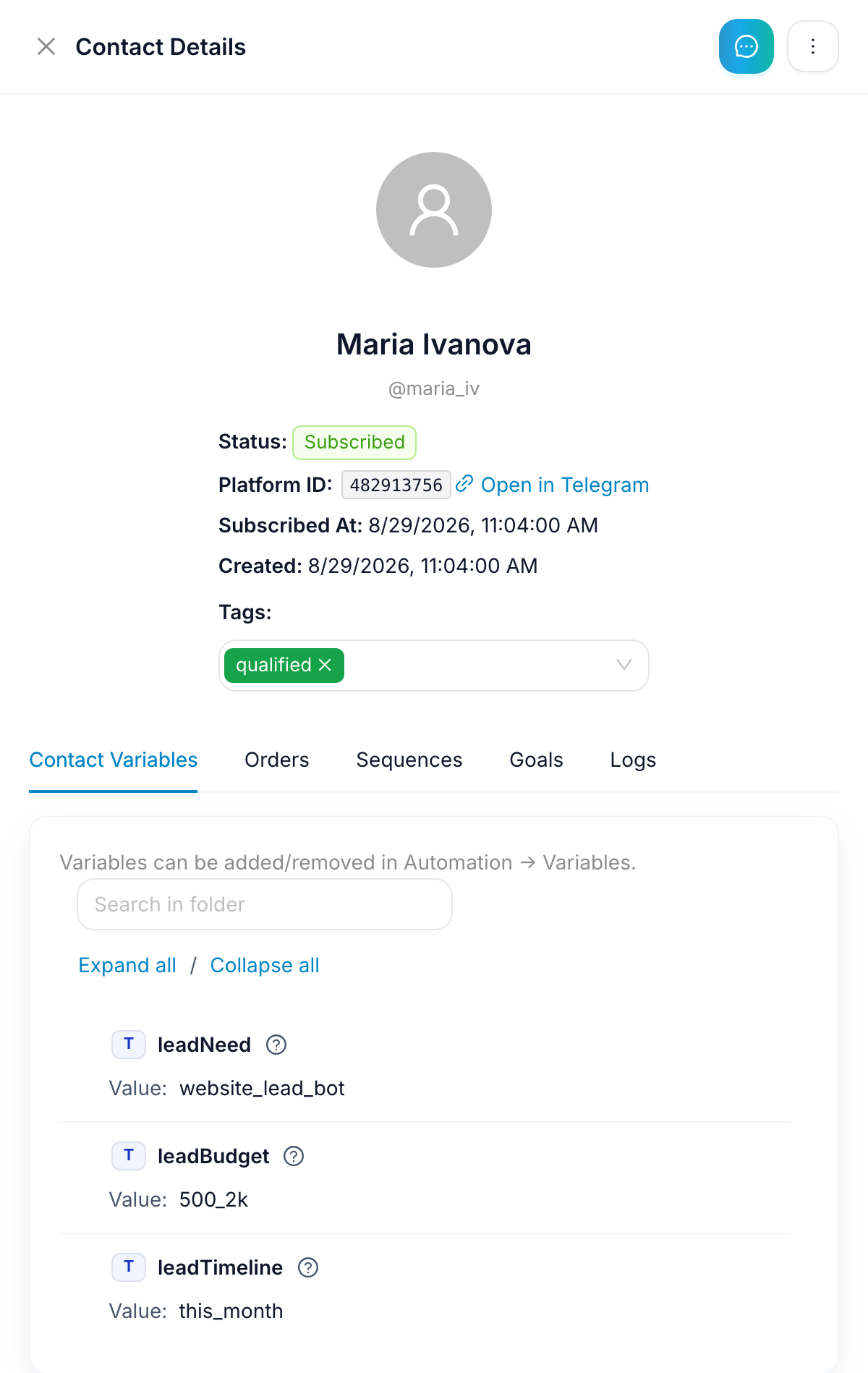
identify sets traits on the contact. In the example bot, /start records the display name, and a three-question /qualify command — plain inline keyboards, all in code — saves the answers as traits when it completes:
const lead = { leadNeed: 'website_lead_bot', leadBudget: '500_2k', leadTimeline: 'this_month' };
ctx.flowcastle.identify(lead);
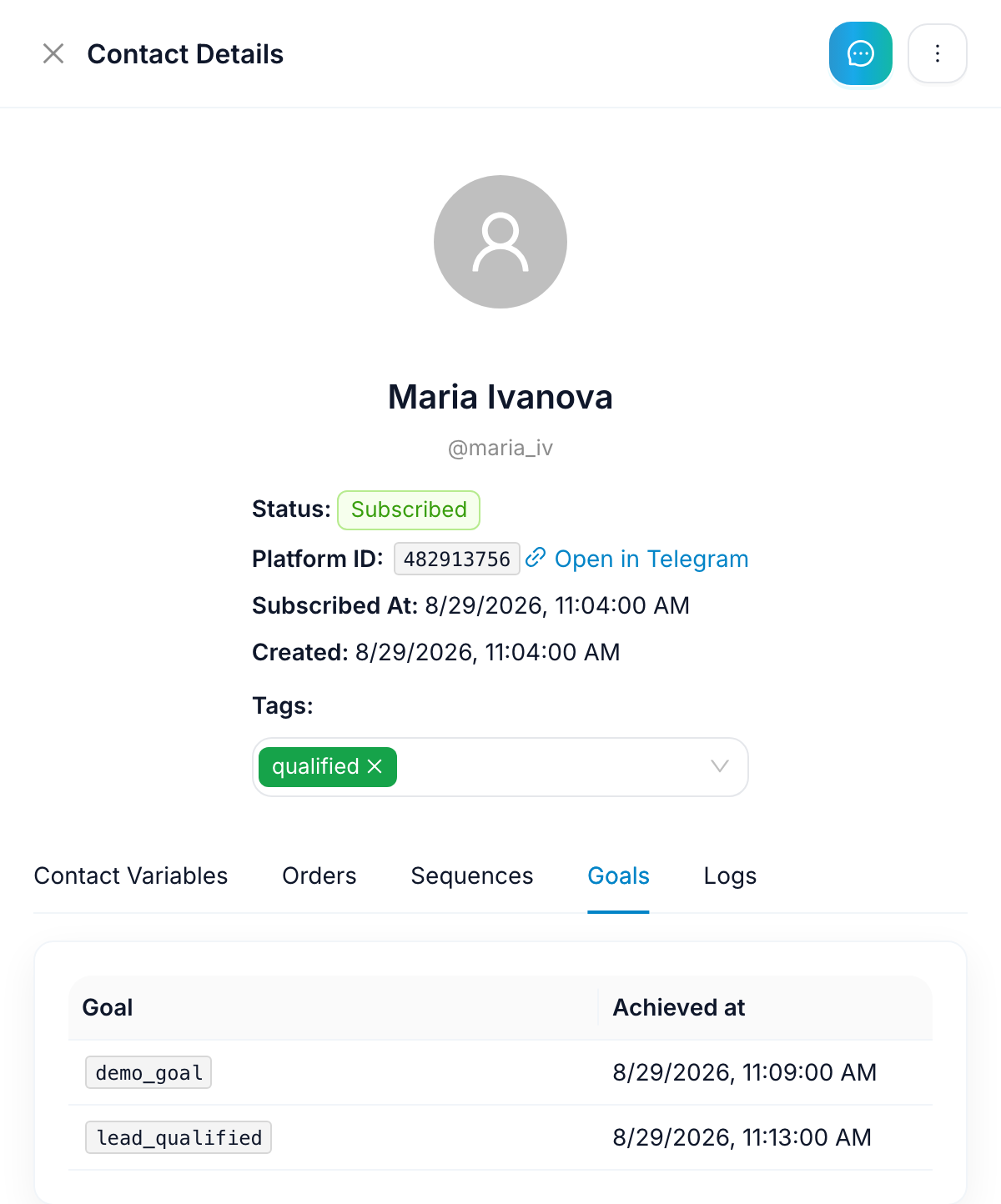
goal records something that matters to the business. The example fires one from a demo button and one when qualification completes:
ctx.flowcastle.goal('lead_qualified', lead);
Goal keys are yours to name — subscription_started, order_paid, whatever your funnel is made of. Add a numeric value prop and revenue shows up in analytics.
Here's what the contact looks like after one run through /qualify — the traits your code sent, next to the tags and status FlowCastle keeps:
And on the Goals tab, the two goals the handlers fired:
Nothing in the bot changed except two lines inside a handler that already existed. Your database is still the source of truth for whatever it was the source of truth for; this is the view your growth and support people were asking you to build.
Step 4: Hand a chat to a human
requestLiveAgent is the third call. The example bot wires it to /human:
bot.command('human', async (ctx) => {
  ctx.flowcastle.requestLiveAgent({ note: 'User asked to talk to a human.' });
  await ctx.reply('Connecting you with a teammate — they will reply right here. 💬');
});

bot.on('message:text', async (ctx) => {
  if (ctx.flowcastle.isLiveAgentActive) return;   // a person has this chat; don't echo over them
  await ctx.reply(`Echo: ${ctx.message.text}`);
});
The conversation opens in FlowCastle's Live Chat. When a teammate replies there, the reply is delivered through your bot process — the SDK pulls it as a job and sends it with your bot's own connection. FlowCastle can only ask your process to run a short allowlist of Bot API methods (sendMessage, sendPhoto, answerCallbackQuery and the like); token, webhook and polling methods are refused no matter what the server sends.
The whole handoff is visible on the contact's activity trail — the user's messages, the live-agent request, the bot's acknowledgement, and the agent's reply delivered back through your bot:
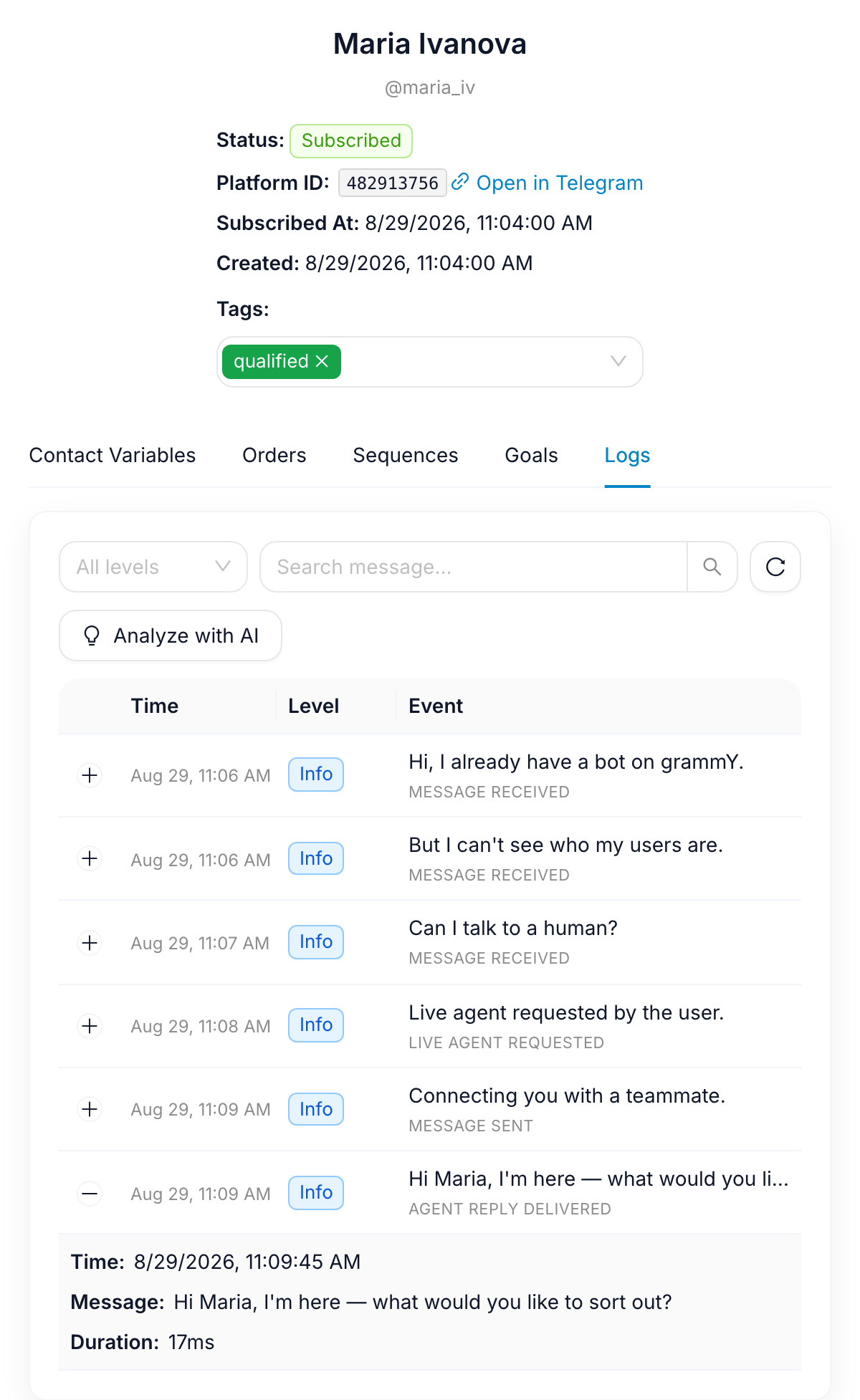
isLiveAgentActive is a local, optimistic hint — a 30-minute window opened by the request and refreshed by delivered agent replies — so your auto-replies step back while a person is engaged. (It's Node-only for now; the Python SDK doesn't expose it yet.)
Step 5: See the bot your code already is
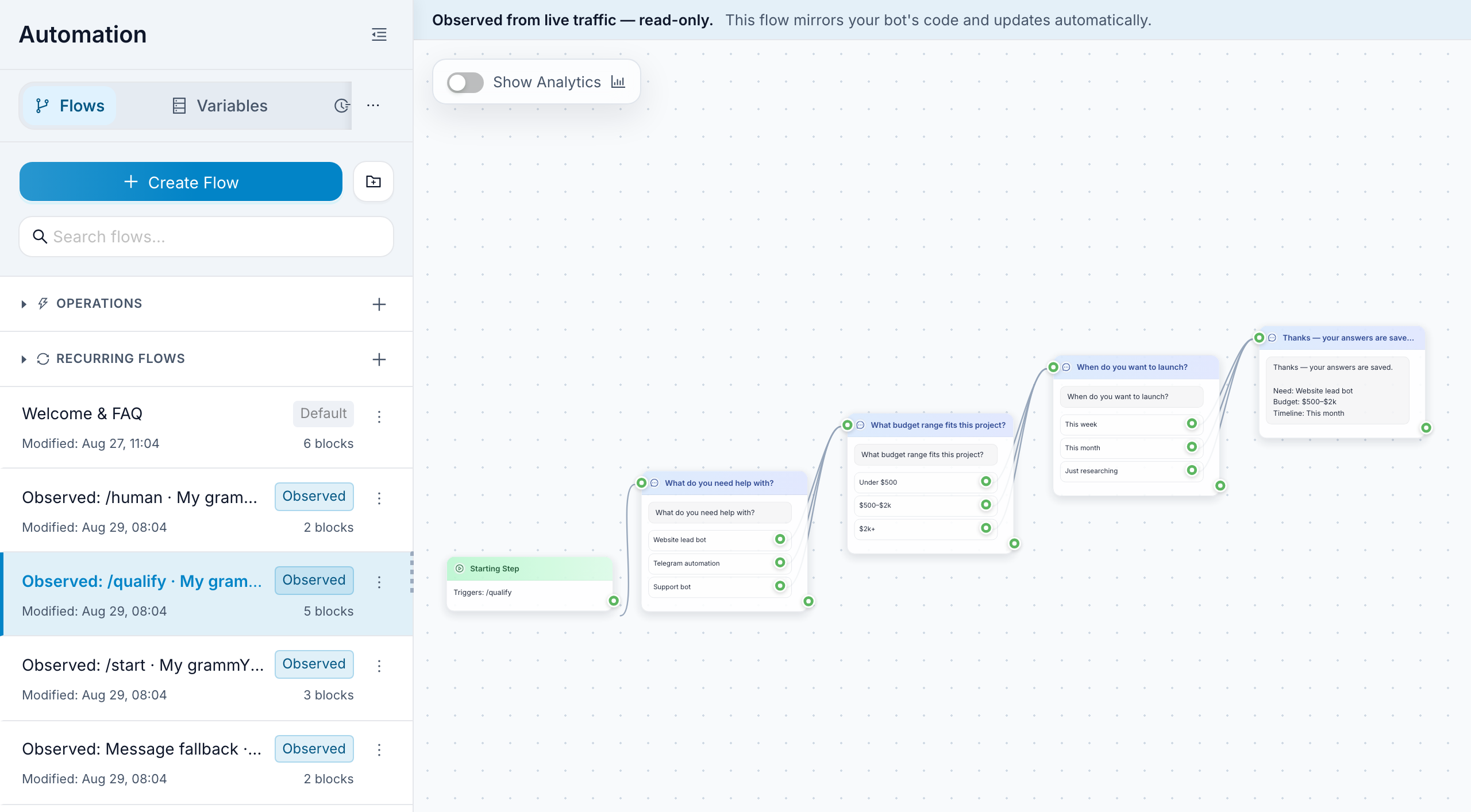
This one surprises people. From the sanitized traffic — which commands lead to which replies, which buttons get pressed — FlowCastle reconstructs the conversations your code handles and lists them on the Automation canvas next to your other flows, one map per entry point, each labeled Observed. For the example bot that's four: /start, /qualify, /human and the plain-message fallback. Open /qualify, hit Auto-arrange, and the journey you wrote in code is laid out as a flow: three questions, nine option buttons, the closing message.
These maps aren't a source of truth — your repository is — and you can delete one at any time and let it rebuild from fresh activity. What it's for: the teammate who can't read your handlers can now see what the bot does, and every step on the map is connected to the analytics below. "Where do people drop off in /qualify?" stops being a question only you can answer.
Step 6 (optional): Let teammates build alongside your code
Because runtime: { enabled: true } is on, the same Automation workspace can hold flows built in the visual editor — onboarding, a follow-up sequence, a support FAQ — and they execute through your bot process. The rules are simple:
- An update that matches a deployed FlowCastle trigger (say, a
/faqcommand your code doesn't handle) is answered by the flow and doesn't reach your handlers, so nobody replies twice. - Everything unmatched falls through to your code exactly as before.
- Your code can start a flow explicitly. The example does this when
/qualifycompletes, passing the answers as inputs:
await ctx.flowcastle.runFlow('lead-follow-up', { inputs: lead });
Only flows you've marked callable from SDK in the dashboard can be started this way. A marketer can then change the follow-up copy, add a step, or A/B the timing — and none of it is a deploy of your bot.
What you get on the dashboard side
Goals, contacts, broadcasts and the observed map all feed one analytics view: subscriber growth, which broadcasts moved which goals, revenue if you send a value.
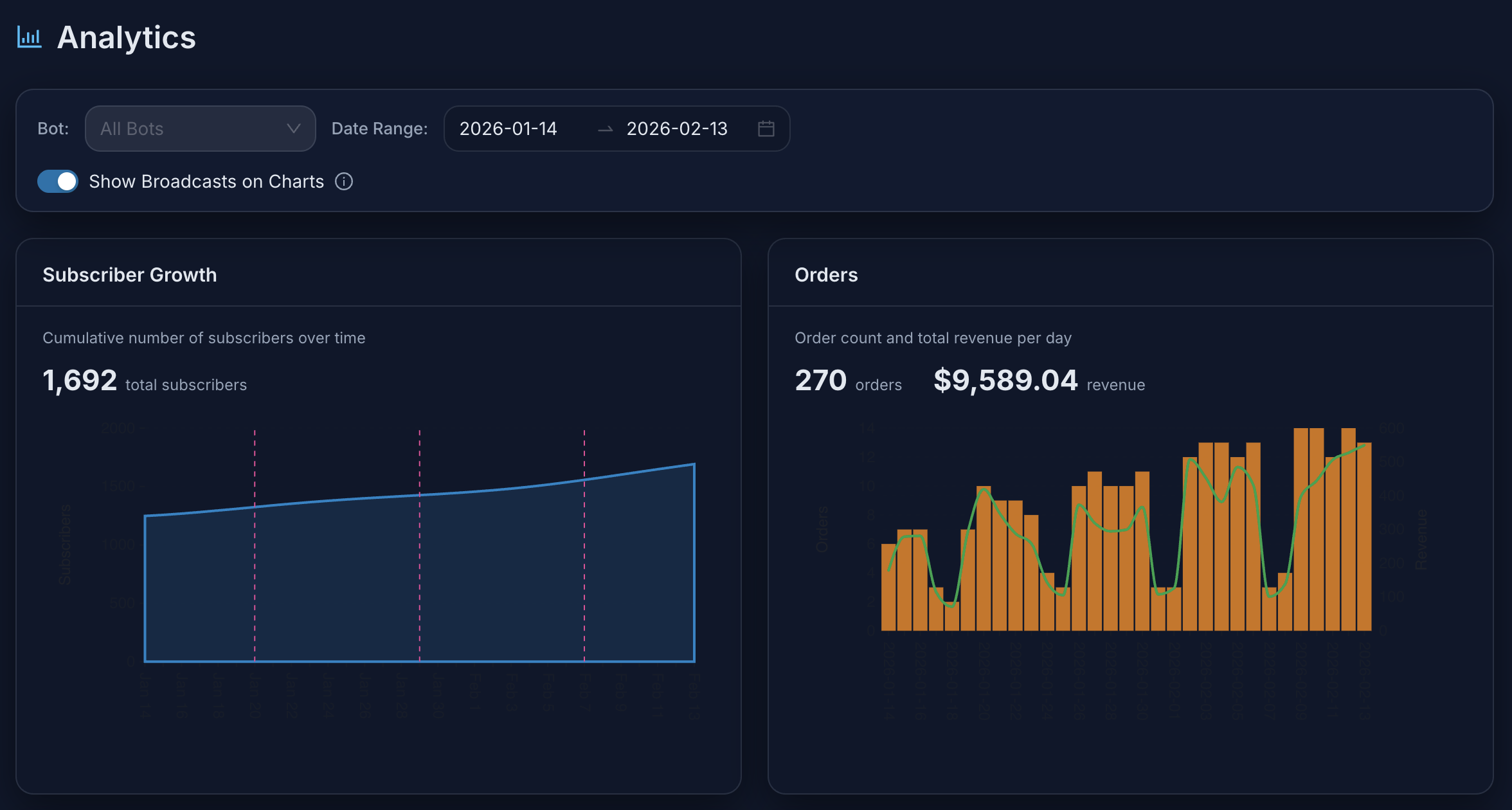
Broadcasts and drip sequences are built in the dashboard and sent through your bot — segmented by the traits and goals your handlers set, so "everyone with leadBudget = 2k_plus who never reached order_paid" is a filter, not a script.
Where to go next
- The example bot, in all four frameworks:
examples/in the SDK repo —/start→ identify, a goal button, code-owned/qualify,/humanhandoff, optional follow-up flow. Copy the folder for your framework and replace the handlers with yours. - Using an AI coding agent? Point it at the agent setup guide — one file with the install order per framework, every option, a verification checklist and troubleshooting. Claude Code, Cursor and Codex wire it in without you reading the docs.
- The privacy and performance contract in full: the README.
- Questions: the FlowCastle bot developers community on Telegram.
Start free at dashboard.flowcastle.ai — no card — and the SDK on GitHub is MIT.