
01When to use it, and when to use the visual builder
- Visual builder. You build the bot in the FlowCastle editor and give FlowCastle the bot token. FlowCastle hosts it. Start with Create Your First Telegram Bot in 10 Minutes.
- Code SDK. Your bot already works in code. Code, hosting, polling or webhooks stay with you. FlowCastle adds the layer around the bot.
- Both. With
runtime: { enabled: true }, flows built in the editor run through your coded bot. An update that matches a deployed FlowCastle trigger is answered by the flow and does not reach your handlers. Everything else falls through to your code. See Triggers: How Your Bot Starts. - Another framework or language. There is no adapter yet.
02Which package
| Bot framework | Runtime | Install | Import |
|---|---|---|---|
| grammY ≥ 1.20 | Node.js ≥ 18 | npm i @flowcastle/grammy @flowcastle/sdk-runtime | import { flowcastle } from '@flowcastle/grammy' |
| Telegraf ≥ 4.16 | Node.js ≥ 18 | npm i @flowcastle/telegraf @flowcastle/sdk-runtime | import { flowcastle } from '@flowcastle/telegraf' |
| aiogram 3.x | Python ≥ 3.10 | pip install 'flowcastle[aiogram]' | from flowcastle.adapters.aiogram import AiogramAdapter |
| python-telegram-bot 21–22 | Python ≥ 3.10 | pip install 'flowcastle[python-telegram-bot]' | from flowcastle.adapters.python_telegram_bot import PythonTelegramBotAdapter |
@flowcastle/sdk-runtime is a peer dependency of both Node packages. npm 7+ installs it automatically, but list it explicitly. The Node packages have zero runtime dependencies. The Python core uses only the standard library.
03Get the key
- Sign in at dashboard.flowcastle.ai. The free plan needs no card.
- Open your application, or create one, and click Add bot.
- Pick Code SDK.
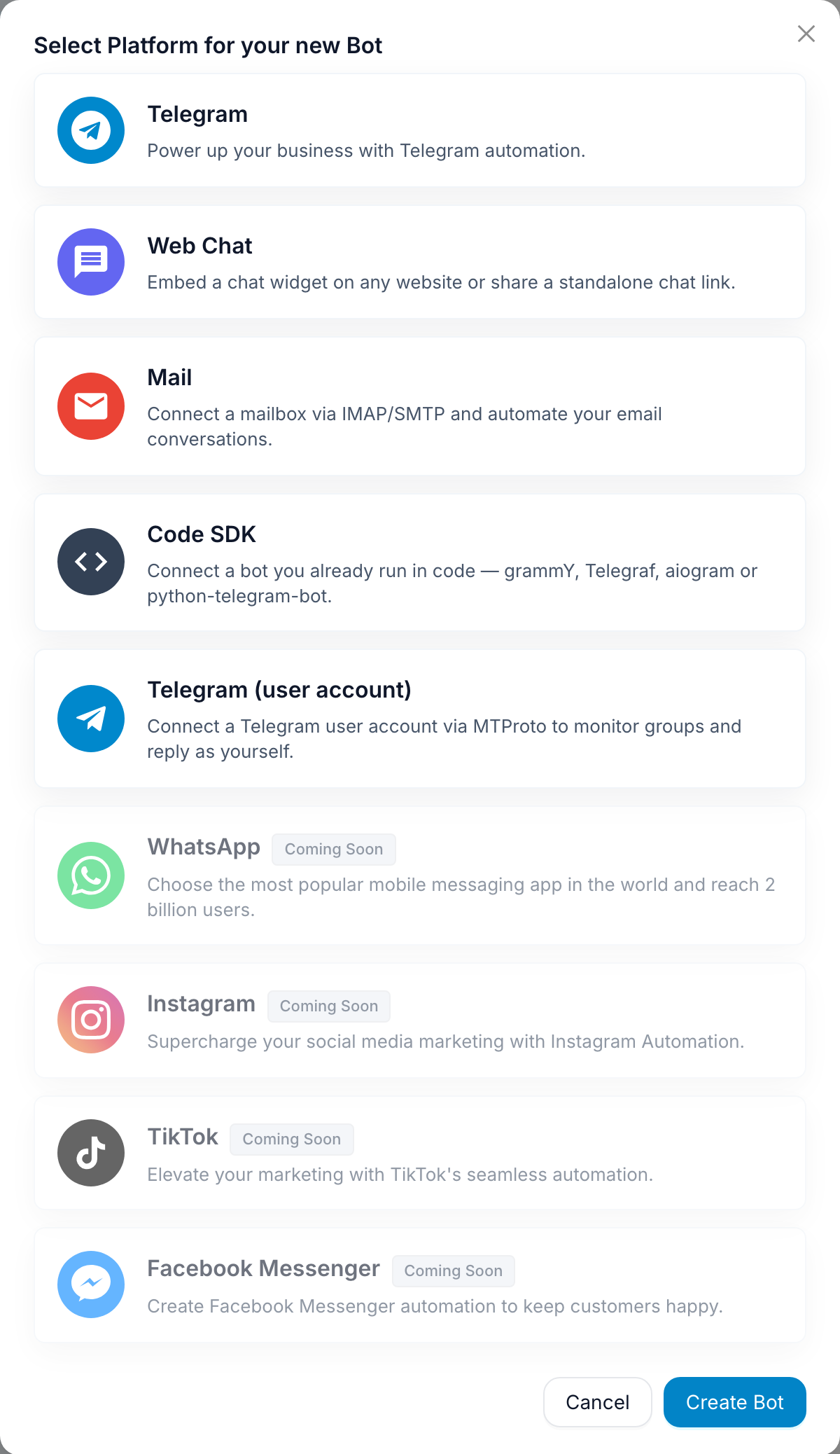
It does not ask for a Telegram token. Name the connection and create it. You get an fc_sdk_… key and the install instructions for the library you pick.
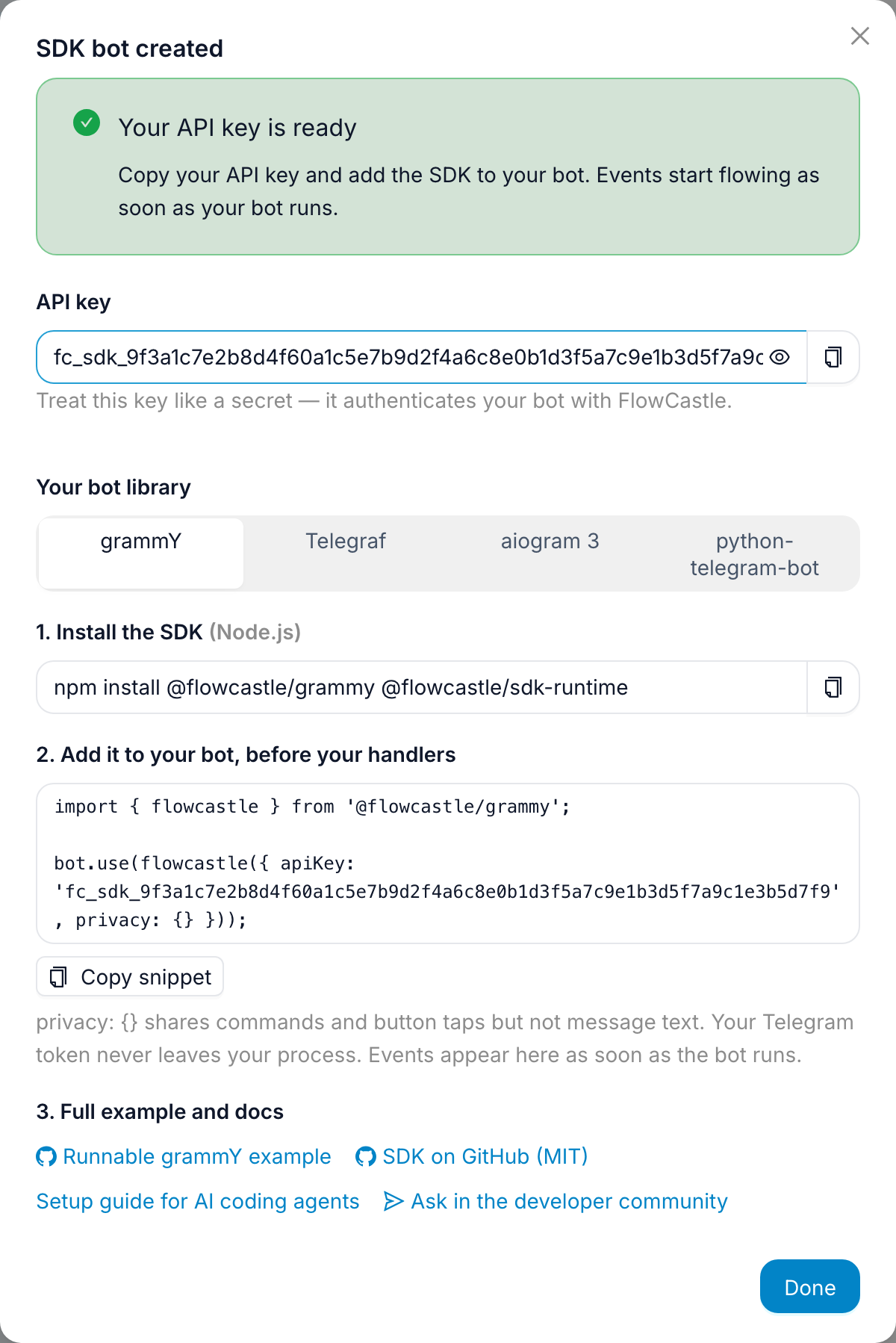
Store the key as FLOWCASTLE_API_KEY next to your BOT_TOKEN. It is a secret: never hard-code it.
04Minimal integration
Two ordering rules for every framework:
- Install FlowCastle before you register handlers, so it sees every update.
- Call
ready()before polling or the webhook starts. It loads the triggers of your deployed flows. Without it, the first matching update may reach a code handler.
grammY:
import { Bot, Context } from 'grammy';
import { flowcastle, FlowCastleFlavor } from '@flowcastle/grammy';

type BotContext = FlowCastleFlavor<Context>;           // adds ctx.flowcastle
const bot = new Bot<BotContext>(process.env.BOT_TOKEN!);

const fc = flowcastle<BotContext>({
  apiKey: process.env.FLOWCASTLE_API_KEY!,
  privacy: {},                                          // see Privacy below
  runtime: { enabled: true },                           // only if no-code flows should run through this bot
  onError: (e) => console.error('[flowcastle]', e),
});
bot.use(fc);                                            // BEFORE other handlers

// ...existing handlers unchanged...

await fc.ready();
bot.start();
// on shutdown: await bot.stop(); await fc.flush(); fc.destroy();
aiogram 3:
import asyncio
import os

from aiogram import Bot, Dispatcher
from aiogram.filters import CommandStart
from aiogram.types import Message
from flowcastle import FlowCastleContext, FlowCastleCore, FlowCastleOptions
from flowcastle.adapters.aiogram import AiogramAdapter

core = FlowCastleCore(FlowCastleOptions(
    api_key=os.environ['FLOWCASTLE_API_KEY'],
    privacy={},
    runtime_enabled=True,
))
adapter = AiogramAdapter(core)
dp = Dispatcher()

# handlers receive the context by argument name `flowcastle`:
@dp.message(CommandStart())
async def start(message: Message, flowcastle: FlowCastleContext) -> None:
    await flowcastle.identify({'displayName': message.from_user.full_name})

async def main() -> None:
    bot = Bot(os.environ['BOT_TOKEN'])
    await adapter.ready()
    adapter.install(dp)                                 # registers an outer middleware on dp.update
    dp.shutdown.register(adapter.stop)                  # final flush
    await dp.start_polling(bot)

asyncio.run(main())
Telegraf and python-telegram-bot follow the same shape. Telegraf also calls fc.wrapTelegram(bot.telegram) to see bot.telegram.* calls made outside middleware. python-telegram-bot calls adapter.install(application) before any add_handler call. Full snippets: Telegraf README, Python README, grammY README.
Webhooks work the same way. Events go into a bounded in-memory queue (500 events, oldest dropped) and are sent in batches every three seconds, with one retry. If FlowCastle is unreachable, the bot loses some analytics, not its users.
05From your handlers
The SDK puts a small API on the context: ctx.flowcastle in Node, the flowcastle argument in aiogram, context.flowcastle in python-telegram-bot.
| Purpose | Node (ctx.flowcastle.) | Python (flowcastle. / context.flowcastle.) |
|---|---|---|
| Record a goal (a conversion or funnel step) | goal(key, props?) | await goal(key, props=None) |
| Set contact traits shown in the CRM | identify(props) | await identify(props) |
| Hand the chat to a person in Live Chat | requestLiveAgent({ note? }) | await request_live_agent(note=None) |
| Is a person handling this chat now? | isLiveAgentActive (Node only) | not available |
| Start a flow built in the editor | await runFlow(flowKey, { inputs? }) | await run_flow(flow_key, inputs=None) |
Rules worth knowing:
goal,identifyandrequestLiveAgentare queued and do not block. Without a sender they are skipped and reported toonError.- Goal keys are yours to name, such as
lead_qualifiedororder_paid. Props are a flat JSON object. Add a numericvalueand revenue shows up in analytics. identifyprops do not go through the privacy filter. Do not put raw message text in them.isLiveAgentActiveis a local, optimistic hint: a 30-minute window opened by the request and refreshed by agent replies. Guard auto-replies withif (ctx.flowcastle.isLiveAgentActive) return;. Python has no equivalent, so skip the guard there.runFlowwaits for the server and returns an execution id. It throws unless runtime is enabled. The flow must be deployed and marked callable from SDK in the dashboard. Wrap the call in try/catch.
Live Chat replies are delivered through your bot process. FlowCastle can only ask it to run a short allowlist of Bot API methods; token, webhook and polling methods are always refused.
06Privacy
Filtering happens inside your process, before anything is queued or sent.
privacy: {}is the routing-only default. Commands and button (callback) ids are shared, free text is not. A contact gets only a Telegram user id.contactFieldsshares the profile fields you choose, for examplecontactFields: ['username', 'languageCode'], so contacts are recognizable in the CRM.messageContent: 'full'sends message text. Use it when your FlowCastle flows must read what users type: AI answers, keyword triggers, wait for reply.transformTextis your own function that redacts text locally, for example emails or card numbers. If it throws or times out (1 second by default), the field is dropped, never sent unredacted.
In Python the keys are contact_fields, message_content and transform_text.
Always pass privacy explicitly. If you leave it out, the SDK keeps the legacy behavior and sends full message content.
07Check it works
- The code type-checks or imports:
tsc --noEmitorpython -c "import bot". - Log errors with
onErrorand start the bot. No[flowcastle]errors within 10 seconds means the key was accepted. A bad key logs a 401 about 3 seconds after the first update. - Send
/startto the bot. Within a few seconds the user appears in Contacts and the SDK bot shows as connected. - If you added a
goal, trigger it. Check it on the contact's record and in goal analytics. - If runtime is enabled, deploy a flow with a
/commandtrigger your code does not handle. Send that command: FlowCastle replies, and your code commands still work. - Stop the process with SIGINT (Ctrl+C). It must exit cleanly and not hang.
08Learn more
- Add a CRM, Live Chat and Analytics to a Telegram Bot You Already Wrote: the full tutorial with screenshots.
- SDK on GitHub: source, README, the privacy and performance contract.
- Agent setup guide: every option, troubleshooting and a do-not list in one file. Point your AI coding agent at it.
- Runnable examples, the same bot in each framework: grammY, Telegraf, aiogram, python-telegram-bot.
- Questions: the FlowCastle community on Telegram, or GitHub issues. Include the framework, package version and
onErroroutput.