
Less chat juggling.More sales from Telegram.
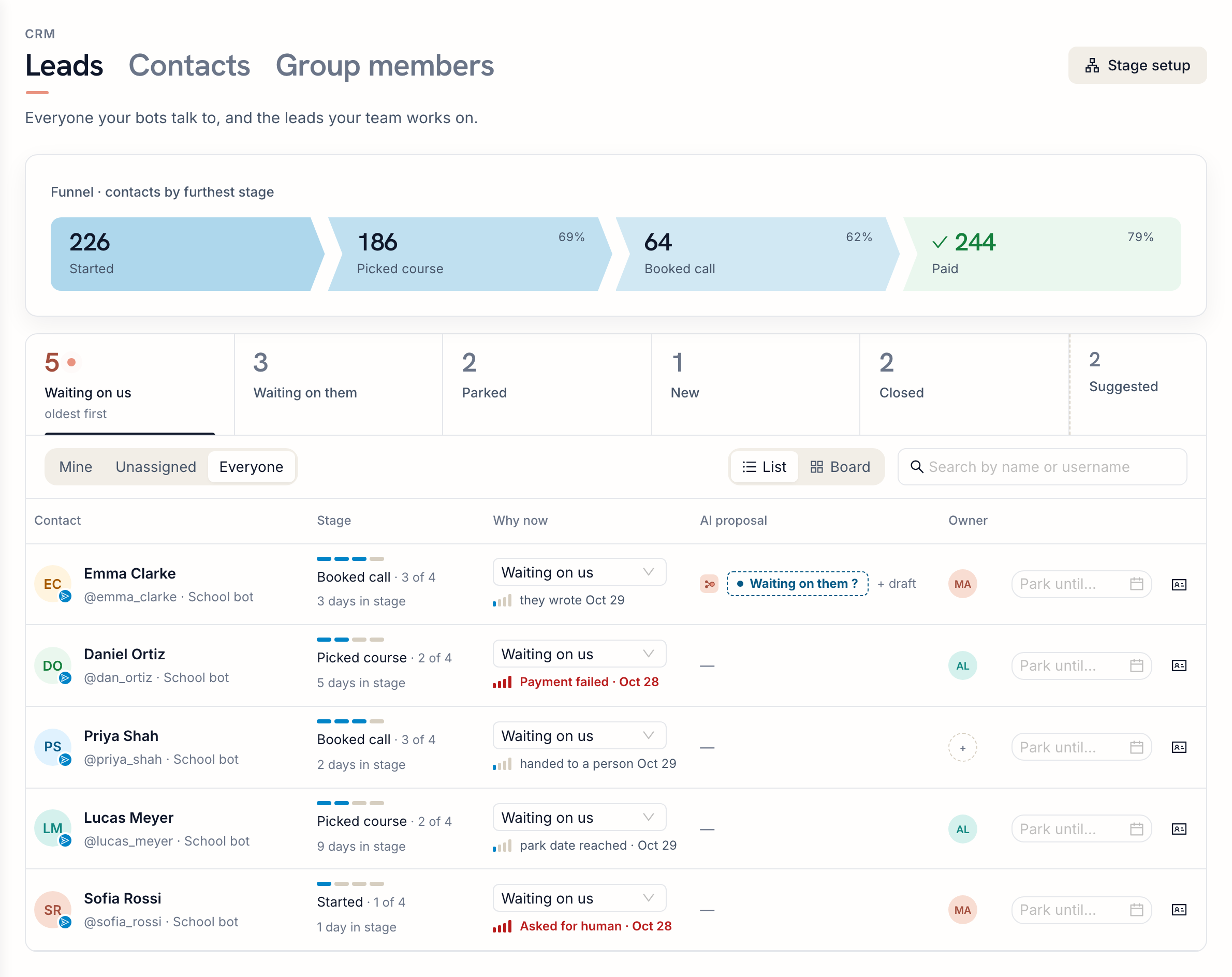
Everyone who writes to your bot lands in one list, sorted by whose turn it is. The AI reads each conversation, suggests the next step and drafts the reply. You decide in one click.
Free plan, no card required.
Sound familiar?
The answer you meant to send
A customer asked about the price on Tuesday. You planned to reply after lunch. By Friday the chat was twenty rows down, and they bought from someone else.
Read means forgotten
Once you open a chat, the unread badge is gone. Nothing reminds you that it is your turn, or that someone promised to pay "next week".
People who never wrote
They started your bot, picked a product and stopped before paying. There is no chat to find them in, so nobody follows up.
Your competitors already answer faster
More and more sellers in Telegram use AI to sort their chats and draft replies. Their customers get answers sooner. A customer who waits a day simply writes to the next seller in the list. Keeping track of leads by memory is no longer enough.
Less routine, quicker decisions, more sales
The CRM does the sorting and the AI does the reading. You keep the part that needs a person: the decision and the conversation.
Less routine
Statuses move by themselves when people write and when you reply. No spreadsheet to update, no reminders to set, no chats to copy anywhere.
Quicker, easier decisions
The AI reads the thread and tells you where things stand, what to do next and what to write. You approve, edit or skip, in one click.
More sales from the same chats
Nobody waits too long, people who said "later" come back on the right day, and people who stopped halfway return to your list. Fewer leads slip away.
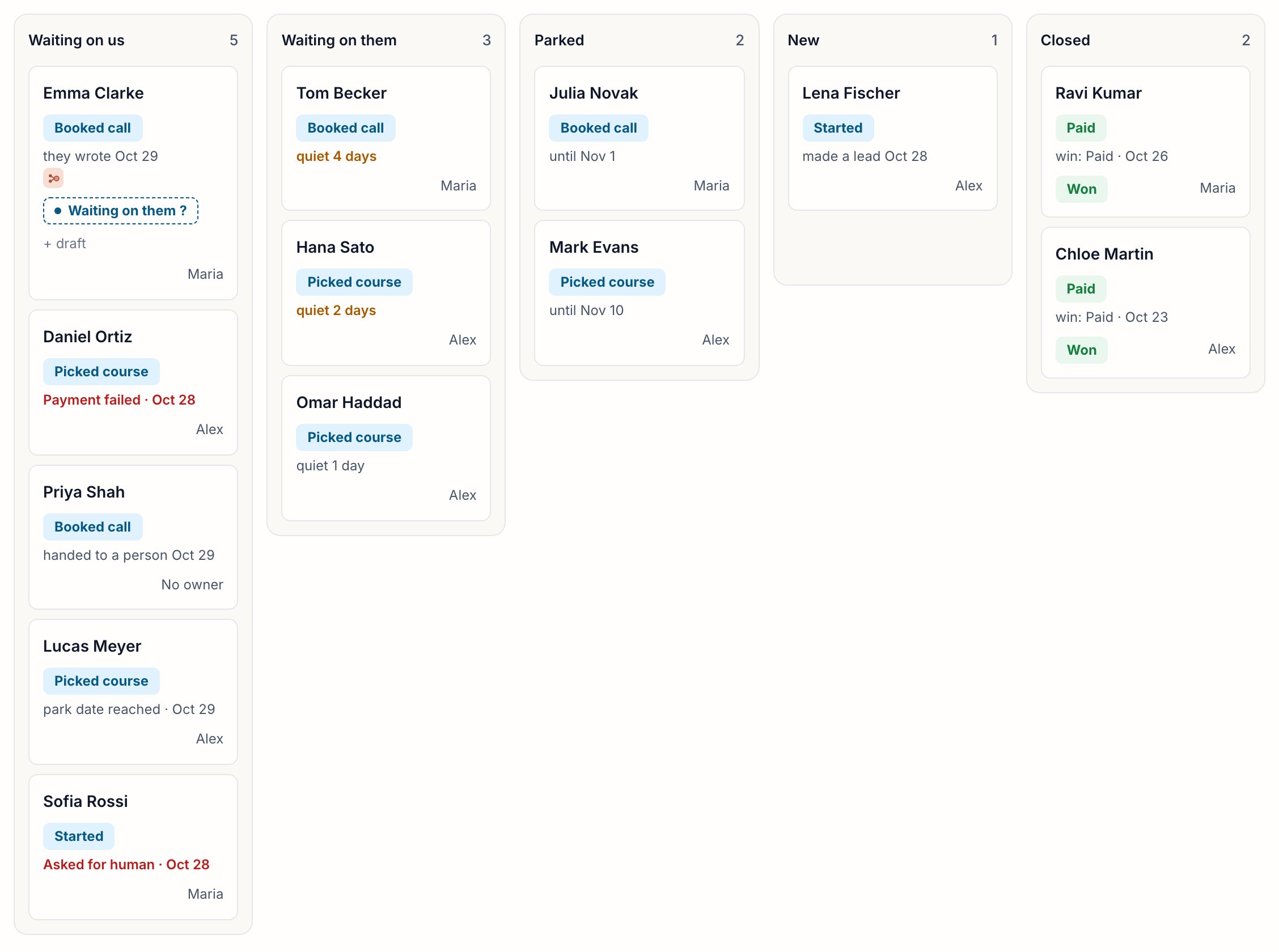
Every lead in the right column
Waiting on us, waiting on them, parked until a date, new, won or lost. Statuses follow the conversation, so the board is up to date without anyone updating it.
- Changes by itself when someone writes or replies
- Parked leads come back on the day you pick
- A morning list of up to five people to reach, in Telegram
The AI does the reading, you make the call
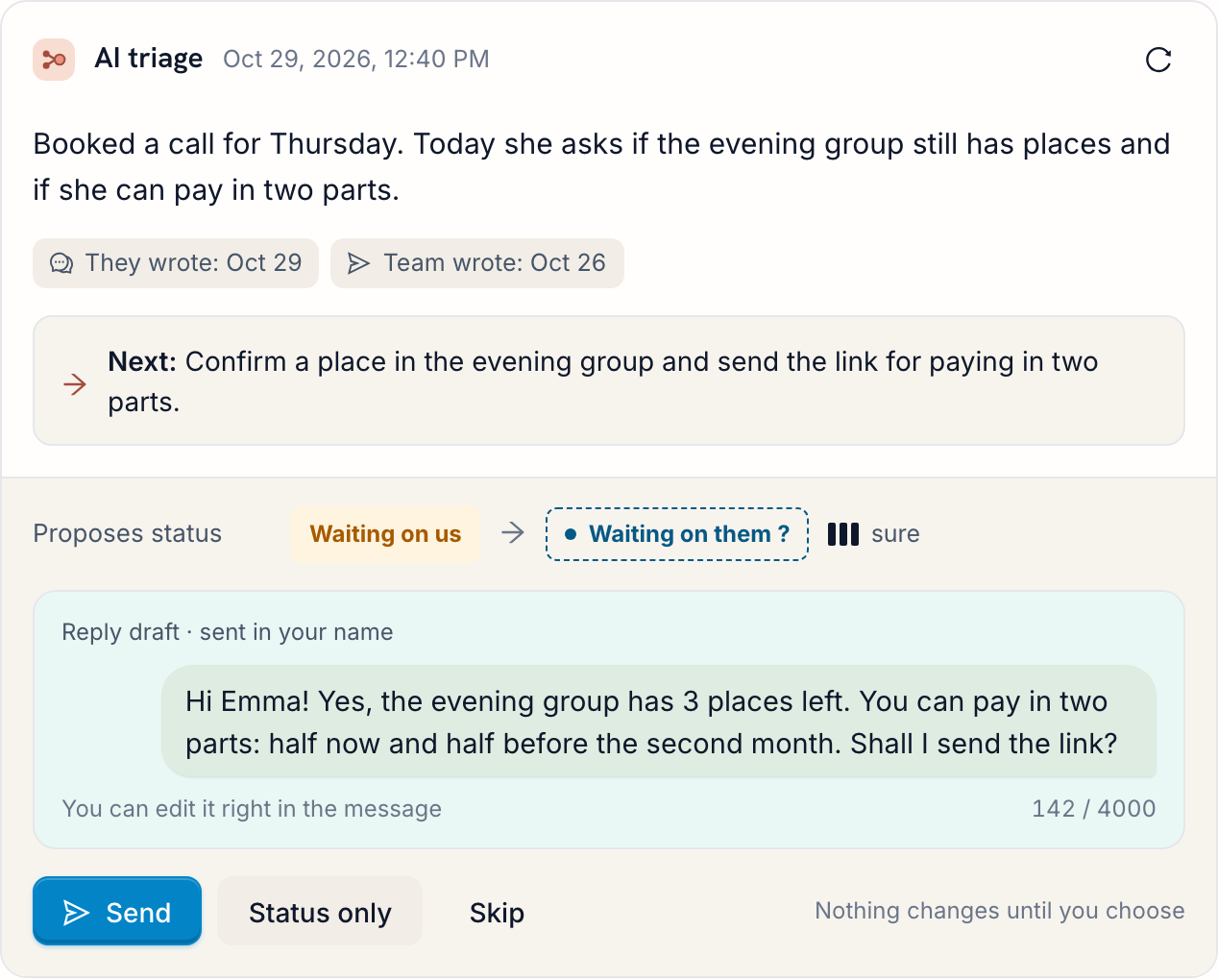
For each lead the AI writes a short summary, the next step and a draft reply in the customer's language. You don't reread the chat to remember what was agreed.
- Nothing is sent until you press Send
- Edit the draft before sending
- Off by default, with a daily limit you set
Find the people who stopped halfway
The CRM knows how long people usually take at each step of your bot. Whoever stays longer than most shows up in Suggested, even if they never wrote a word.
- Built from the steps your bot already tracks
- Make lead or dismiss in one click
- People who unsubscribed are never suggested

A sales funnel without drawing one
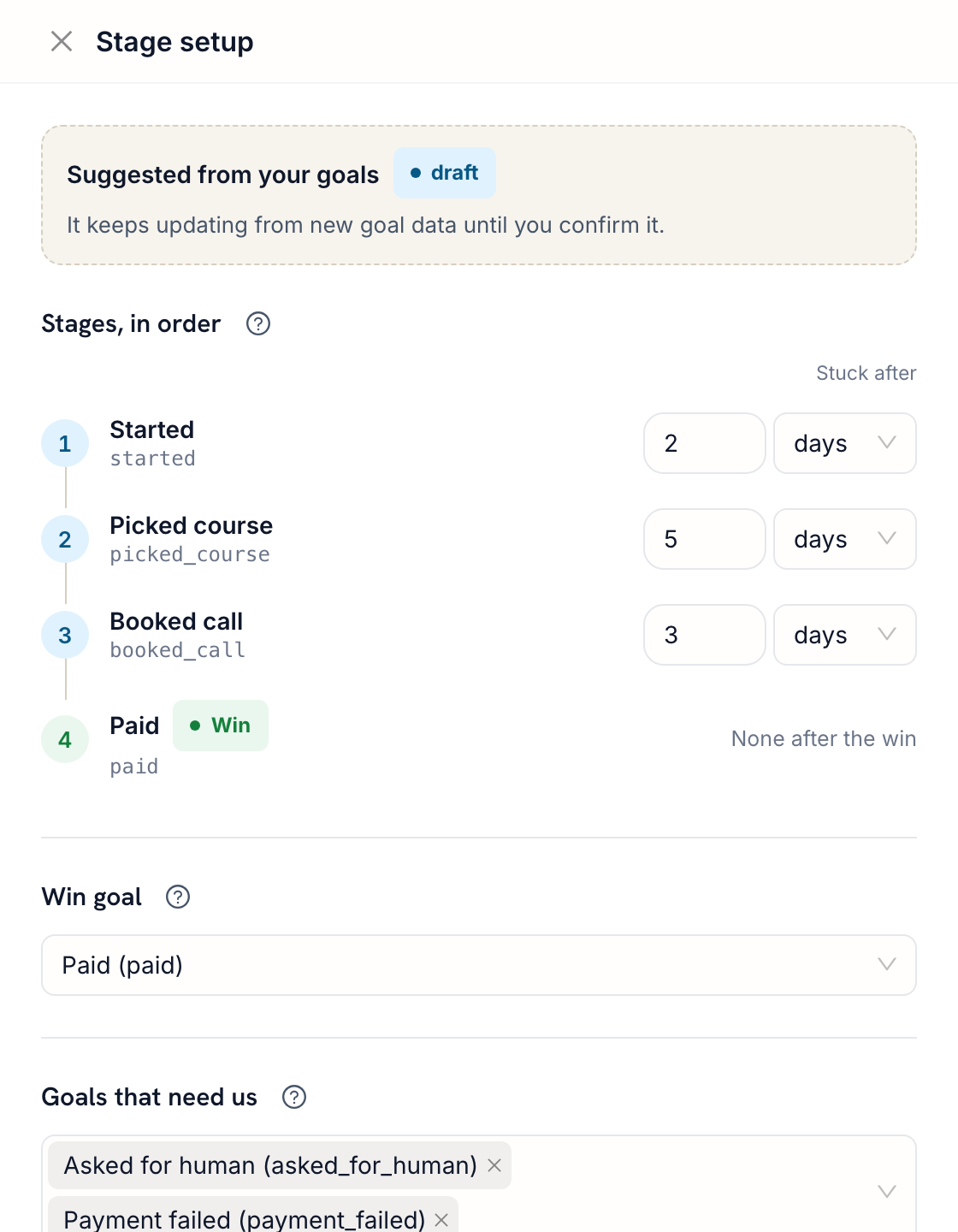
Your bot already marks steps like started, picked a course, booked a call, paid. FlowCastle turns them into stages, suggests which one is the win, and you confirm.
- Stages from real data, not guesses
- The win step marks leads Won by itself
- Set how long is too long for each stage
Let AI answer the simple questions
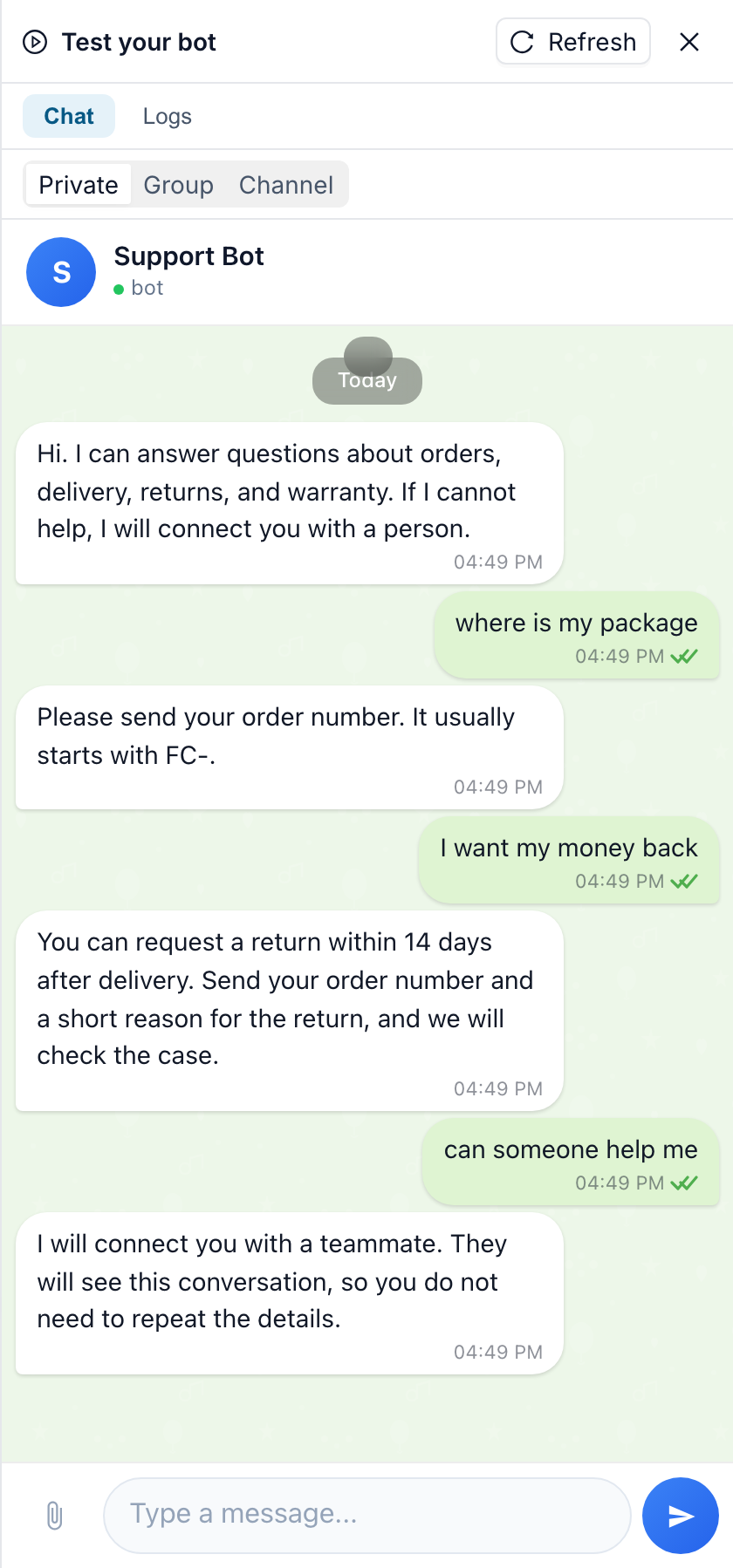
Add an AI support step to your bot. It answers questions about prices, delivery or schedules from your knowledge base, day and night. When a question needs a person, the bot hands the chat over, and the lead goes straight to Waiting on us with the whole conversation.
- Answers from your knowledge base, for example your website pages
- Hands the chat to a person when it can't help
- Start from a ready-made template
Why not a spreadsheet or a separate CRM?
Both can work. Here is where each one helps and where it costs you time.
| What matters | A spreadsheet | A separate sales CRM (Kommo, amoCRM, Bitrix24) | FlowCastle CRM |
|---|---|---|---|
| Sees what the person did in the bot | No | Only with an integration you set up | Yes, it is the same system |
| Statuses update by themselves | No, by hand | With automation rules you build | Yes, from the conversation |
| Finds people who stopped in the bot | No | Only with a custom integration | Yes, in Suggested |
| AI suggests the next step and drafts a reply | No | Depends on the product and plan | Yes: drafts for your team, and AI support answers simple questions itself |
| Nothing extra to keep in sync | You copy chats by hand | A second system, usually paid per seat | Part of your bot platform |
| Deals with amounts, phone calls, email | No | Yes, that is their strength | Not built in, but you can connect your CRM, phone system or email without code |
Missing an integration you need? Message our support bot, and we will add the module for free. Ask for a module
How to start
Pick the way that fits where your bot is today.
Build in the no-code editor
Start a new bot, or connect one you already made in BotFather: it keeps its name and link, and FlowCastle answers instead of your old code. Build the flow from blocks, or describe it to the AI assistant.
Keep your bot in code
Your bot runs on grammY, Telegraf, aiogram or python-telegram-bot? Add our open-source SDK. Your code and your token stay with you, and contacts, goals and live chat show up in the CRM.
Move from another builder
Your bot is on ManyChat, SendPulse, BotHelp or another platform? Tell us what it does, and we will help you move it to FlowCastle.
Ask us to move your bot
Tell us where the bot is now and what it does. We reply within one business day.
Questions
Do I still need a separate CRM like Kommo, amoCRM or HubSpot?
Not to keep track of who to answer in Telegram. Contacts, statuses, funnel stages and chats are in FlowCastle, next to the bot. If you also need deals with amounts, invoices, phone calls or email in one place, you can keep your sales CRM and connect it to the bot without code. If there is no ready-made module for it yet, we will add one for free.
Does it work with a bot I already have?
Yes. A bot made in BotFather can be connected by its token and rebuilt in the editor. A bot written in code (grammY, Telegraf, aiogram, python-telegram-bot) can stay in code and connect through the open-source SDK: its contacts, goals and live chat replies reach the CRM. A bot on another builder we can help you move.
Does the AI write to customers by itself?
It depends on which AI. AI support in the bot does: it answers customers on its own from your knowledge base and hands the chat to a person when it can't help. AI triage in the CRM doesn't: it only suggests a status, the next step and a draft reply, and a person presses Send. AI triage is off by default, uses AI credits and has a daily limit you set.
Do button taps and /start count as messages?
For bots built in FlowCastle, no: only messages the person types change a status. Menu taps, commands and answers to the bot's questions don't. Telegram reply-keyboard buttons are the exception, because they arrive as typed text. For bots connected through the SDK, every message counts, including /start.
Can my team work on it together?
Yes. Each lead has one owner, and the Mine / Unassigned / Everyone filter shows who handles what. When you assign a chat in Live Chat, the lead's owner changes with it.
Stop losing leads in your Telegram chats
Turn on the CRM in your workspace and see who is waiting for you today.
Start for free