

Everything this guide builds is available as a ready-made flow — clone it and adjust instead of starting from scratch.
Open the templateA lead bot earns its keep when it does two things well: it replies instantly, and it asks the right questions before a human gets involved. If it only says "leave your phone number," it is a slower contact form. If it collects the reason for the request, the budget range, and the expected timing, your team can decide who should answer first and what to say when they do.
In this walkthrough, you will build the simple version: one Telegram flow that welcomes a new contact, asks three button-based questions, stores the answers on the contact, and sends a qualified lead summary to your team. No code, no AI support branch, no complex routing. The point is to get a useful lead bot live in about 10 minutes, then improve the questions after real conversations start coming in.
What you'll build
The finished flow has one straight path: a welcome message, three qualifying questions, a team notification, and a final confirmation for the contact. Each question stores the last clicked button directly into a contact variable, so the context follows the person later for personalization, filters, and broadcasts. If you'd rather skip the build entirely, a ready-made template covering this exact flow is linked at the end of the article.

The complete lead-qualification flow before publishing it to Telegram.
Step 1: Create the flow and the welcome message
Start with a new flow in the editor. Add a message block near the beginning of the canvas and write the first thing the bot will say when someone opens the chat. Keep this message short. It should explain who is answering and why the bot is asking questions.
Use this opener:
Hi, thanks for reaching out. I will ask 3 quick questions so our team can understand what you need and reply with the right context.
That copy does three jobs. It confirms the conversation started, tells the person the bot will not waste their time, and makes the qualification step feel normal. Avoid a long sales pitch here. The user has already opened Telegram; the next best action is to start the questions.
Place the welcome message before the first question. Connect it forward so the conversation continues automatically after the opener.
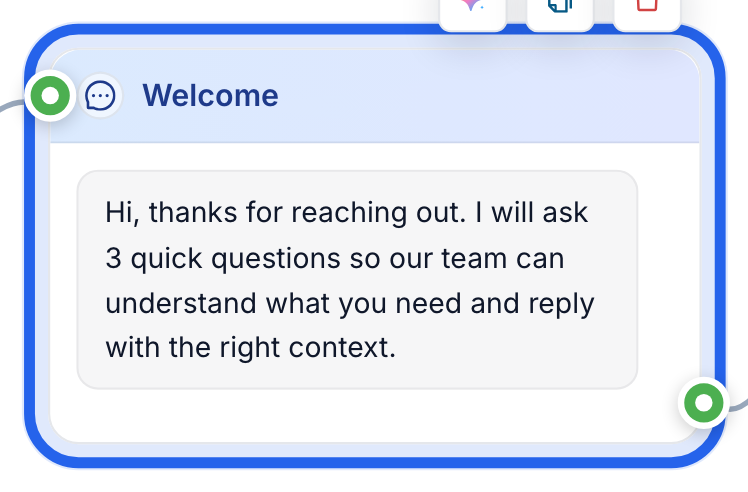
The welcome message sets expectations before the qualification questions begin.
Step 2: Ask qualifying questions with buttons
Now add the three questions, one at a time, each as a message with buttons. Buttons beat free text here: answers stay clean, consistent, and easy to reuse, while the person can still reply in one tap.
Question 1:
What do you need help with?
Buttons:
- Website lead bot
- Telegram automation
- Support bot
Question 2:
What budget range fits this project?
Buttons:
- Under $500
- $500–$2k
- $2k+
Question 3:
When do you want to launch?
Buttons:
- This week
- This month
- Just researching
Connect the welcome message to Question 1, then connect each answer path to Question 2, then Question 3. For a first version, all answers can continue to the same next question. You are not trying to build a complex decision tree yet. You are collecting three fields that make the lead useful.
If your business needs different labels, change the wording, but keep the shape. Three questions is enough to qualify without making the chat feel like paperwork.
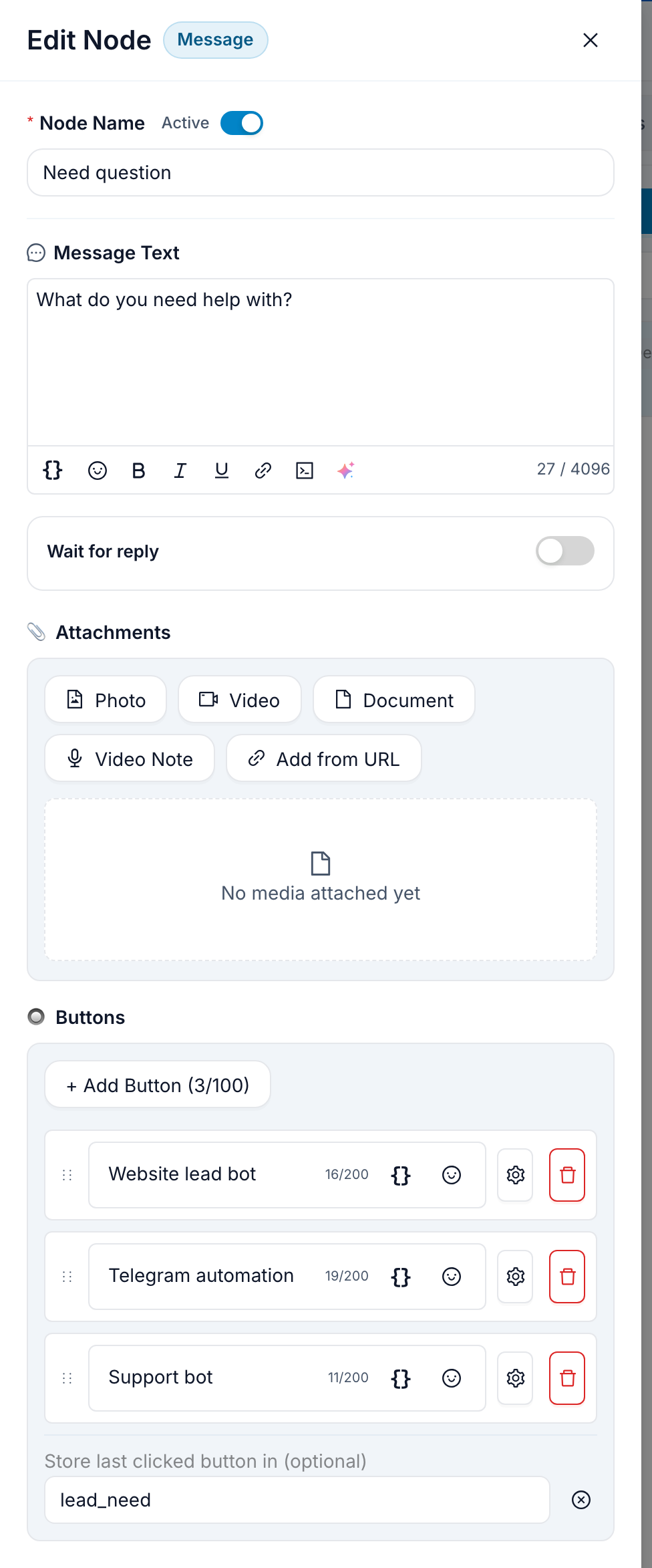
Each question is one message block: text, optional media, and its own button list.
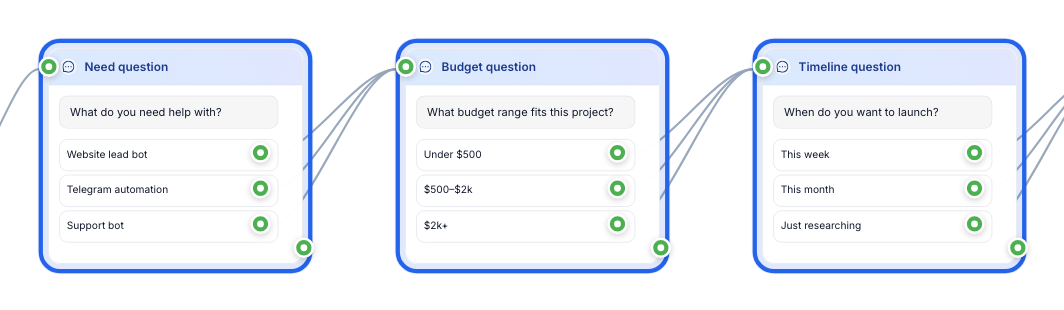
Button answers keep lead data clean and branchable.
Step 3: Save answers to the contact
For each question message, use the button section's Store last clicked button in setting and choose a contact variable. No separate action block is needed. Use clear variable names so the values make sense outside the flow:
lead_needlead_budgetlead_timeline
These variables are the difference between a chat and a reusable contact profile: when someone from your team opens the contact later, the key details are already attached, ready for follow-up broadcasts, filters, or personalization.
For example, a contact who chose "Support bot," "$500–$2k," and "This month" should carry those values after the conversation ends. The team should not have to scroll through the chat transcript to understand why the person reached out.
Configure this on all three question messages before the team notification fires. The important rule is simple: every selected button should end up on the contact before the handoff.
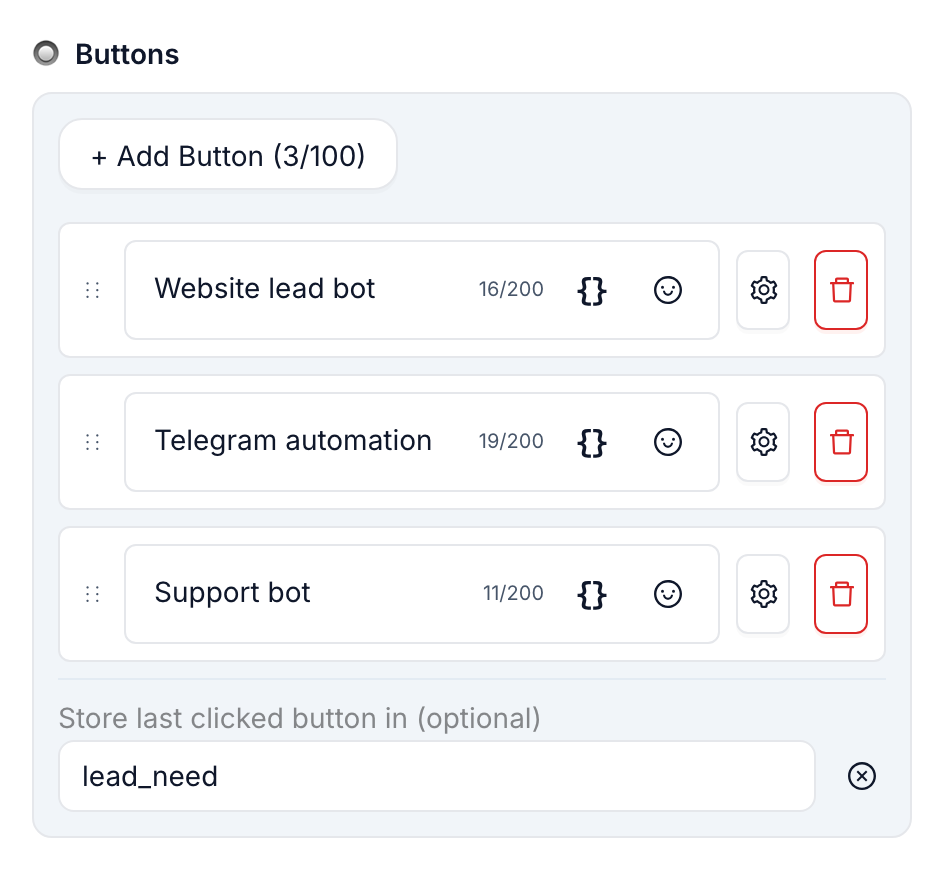
The button settings panel is where a question's answer gets pointed at a contact variable — here, lead_need.
Step 4: Notify the team with the answers attached
Once the three answers are saved, add the team notification. This is the handoff point: the lead has finished the short qualification path, and a human can now reply with enough context to be useful.
Write a compact notification message, then insert the saved answers with the variable picker. You do not need to type technical placeholders by hand: click the variable button in the message field and choose lead_need, lead_budget, and lead_timeline from the contact variables.
New qualified lead from Telegram

Need: {{lead_need}}
Budget: {{lead_budget}}
Timeline: {{lead_timeline}}

Open the Telegram chat and reply while the context is fresh.
In the editor those fields appear as variable chips, not as raw code — the {{...}} above is simply how the placeholder reads; you insert it by clicking the variable button, never by typing the braces. Send this notification to the Telegram chat or channel your team already uses for incoming leads, and keep it compact: the goal is context for the next human, not a full CRM record.
A message to your team's chat is the simplest handoff. In higher-volume setups, you might instead open a live conversation for an operator inside FlowCastle — covered in the AI support walkthrough — or push the lead into Google Sheets or a CRM, which we'll cover in an upcoming article.
After the notification, add a short confirmation back to the contact:
Thanks. I sent your answers to the team, and someone will reply here soon.
That final message closes the loop. The person knows the bot did something with their answers instead of dropping them into a silent form.
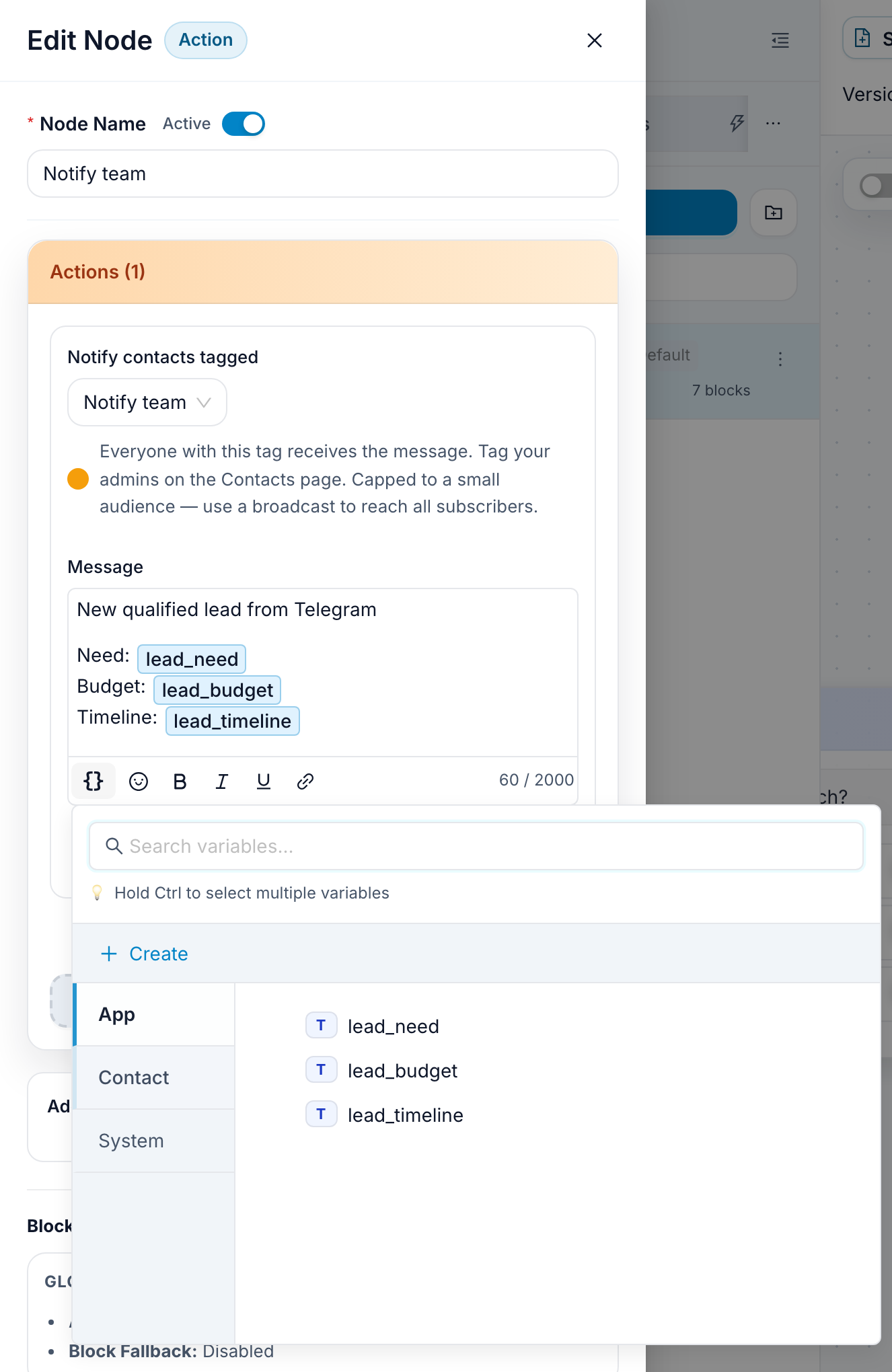
Use the variable picker to add contact fields as chips in the notification message.
Step 5: Publish and test
To run the flow in Telegram, connect your bot token from @BotFather — Telegram's official bot tutorial walks through getting the token from @BotFather. FlowCastle asks for the token once when you connect the bot.
After the bot is connected, publish the flow and use FlowCastle's Test panel before sending real traffic. Send /start, read the welcome message, tap one button for each question, and open the Chat tab to confirm it shows the same answers you selected.
Test the boring path first: one complete conversation from start to finish. Then test one or two different answer combinations. You are looking for three things: every question appears in the right order, every selected answer is saved to the contact, and the team notification is readable without opening the whole chat history.
If any of those fail, fix the flow before sending traffic to the bot. A lead bot is only useful when the handoff is trustworthy.
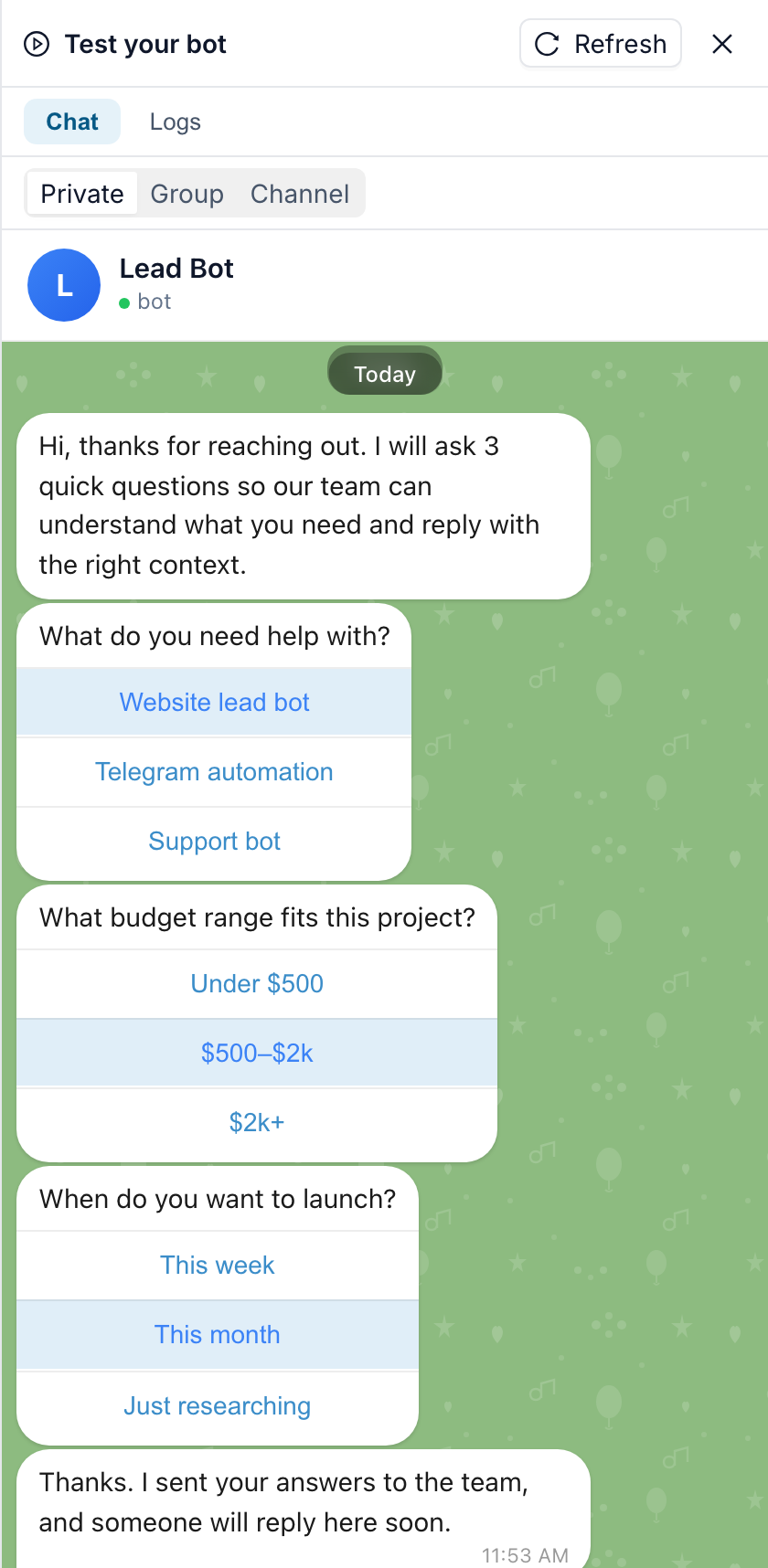
The Chat tab shows the entire test conversation end to end, including the confirmation message.
Try it on your own site next
When the Telegram version works, run the same flow in the website chat widget without rebuilding it — it's a JavaScript snippet embed, and the bubble on flowcastle.ai is itself a FlowCastle bot, so the same logic can greet visitors on your site and in Telegram.
When you outgrow this flow
The next version is not "more questions." It is a broader lead-capture template with AI answers from a knowledge base, live-agent takeover, and, coming soon, tracking the same person from your website to Telegram. If you need the support use case today, read the AI support walkthrough; keep this tutorial focused on the fast qualification flow.
Clone the Lead Qualification template, change the three questions to match your sales process, and publish it to your Telegram bot. The first version should stay simple: greet, qualify, save, notify, and let a human take over with context.