

We make FlowCastle, a no-code bot builder, so of course we would like you to build your bot with us. That is exactly why this guide covers all three ways to make a Telegram bot — including writing code yourself — and says when each one is the right call.
Short answer: you do not need to code. Get a token from @BotFather in Telegram (two minutes, free), connect it to a no-code builder, put together a menu with buttons, and publish. A simple bot that answers questions and collects requests takes an evening, not a week.
At the end there is a link to a ready-made template, so you can start from a working bot instead of a blank canvas.
What a Telegram bot actually is
A bot is a Telegram account run by a program instead of a person. People find it by its username, press Start, and the program answers: it sends messages, shows buttons, asks questions and remembers the answers.
Two things surprise most beginners:
- The bot needs somewhere to run. Telegram only passes messages along. The logic that decides what to reply has to live on a server, and that server has to be on all the time. With code, that server is your job. With a builder, the builder runs it.
- A bot cannot message someone first. A person has to open the bot and press Start before the bot can write to them. There is no way around this; it is how Telegram prevents spam.
Step 1: Get a token from @BotFather
Every bot is created through @BotFather, Telegram's own bot. It is free and works the same whichever way you build.
- In Telegram, search for @BotFather (it has a blue verified check) and open it.
- Send
/newbot. - Type a name. This is what people see at the top of the chat, for example
Anna's Studio. - Type a username. It must be 5–32 characters, use Latin letters, numbers or underscores, and end in
bot, for exampleanna_studio_bot. Popular names are taken, so expect a few tries. - BotFather replies with a token that looks like
123456789:AAHdqTcvCH1vGWJxfSeofSAs0K5PALDsaw.
The token is the password to your bot. Whoever has it controls the bot. Do not post it in chats or screenshots. If it leaks, send /token to BotFather to get a new one; the old one stops working.
Step 2: Pick how you will build it
There are three realistic ways. None of them is right for everyone.
| Write code | No-code builder | AI builder | |
|---|---|---|---|
| What you do | Write the bot in Python or JavaScript with a library such as aiogram or python-telegram-bot | Draw the conversation on a canvas from blocks | Describe the bot in plain words and get a draft |
| Hosting | You rent and maintain a server | Included | Depends on where the AI puts the bot |
| First bot in | days, if you are learning | an evening | minutes for the draft, then checking |
| Ceiling | none | whatever the builder supports | same as where the draft lives |
| Good fit | developers, unusual logic | businesses, experts, marketers | anyone with a clear idea of the bot |
Code is free in terms of libraries and has no ceiling. The cost is time: learning, hosting, restarting the bot when the server reboots, and fixing it at 2am. If you are a developer, or your bot has logic no builder will ever have, write code.
A no-code builder removes the server and the programming. You pay for it with limits: you can only do what the builder's blocks do. So check the ceiling before you commit. In FlowCastle the escape hatch is a step that calls any external API and a step with your own code, so non-standard logic still fits. Not every builder has that.
An AI builder comes in two flavors. You can ask a general AI chat to write the code for you, but you still get code: you still need a server, and you still have to debug it. Or you can use AI inside a builder. In FlowCastle, Build with AI turns a description into a draft flow on the canvas, which you can then read and edit block by block.
Whichever way you build, read the draft before you publish, especially anything about money, prices or contacts.
For a comparison of specific tools, see the best Telegram bot builders in 2026.
Step 3: Build a simple bot in FlowCastle
Here is the shape of a first bot that is actually useful to a small business: a menu with buttons, a way to leave a request, and a notification to you. The click-by-click version, with every screen named, is in Create Your First Telegram Bot in 10 Minutes. Below is what to build and why.
1. Start with a working bot, not a blank page. After signing up, choose Start blank. Despite the name, it creates two flows so the bot answers from minute one: a Welcome flow and a Main menu with three example buttons.
2. Make the menu yours. Open Main menu and rename the buttons to what people actually want from you, for example Services and prices, Leave a request, Ask a question. Three or four buttons is plenty. Each button leads to its own reply.
3. Collect the request. Behind Leave a request, add two messages: "What is your name?" and "What is the best number to reach you?". On each, turn on Wait for reply: the bot stops and waits for the answer. Save the answers to variables such as lead_name and lead_phone. For the phone, set the reply type to Phone and turn on the Share my phone button, so people can send their number with one tap. The details are in Ask Questions and Collect Answers.
4. Notify yourself. Add a Service Notification action with text like New request: {{lead_name}}, {{lead_phone}}. Insert the variables with the variable picker as chips; do not type the braces. It arrives by email and in FlowCastle's service Telegram bot if you have linked your Telegram, and it works even though you never started your own bot. Other ways to notify, including a group chat for your team, are in Notify an Admin or Send a Message to Another Chat.
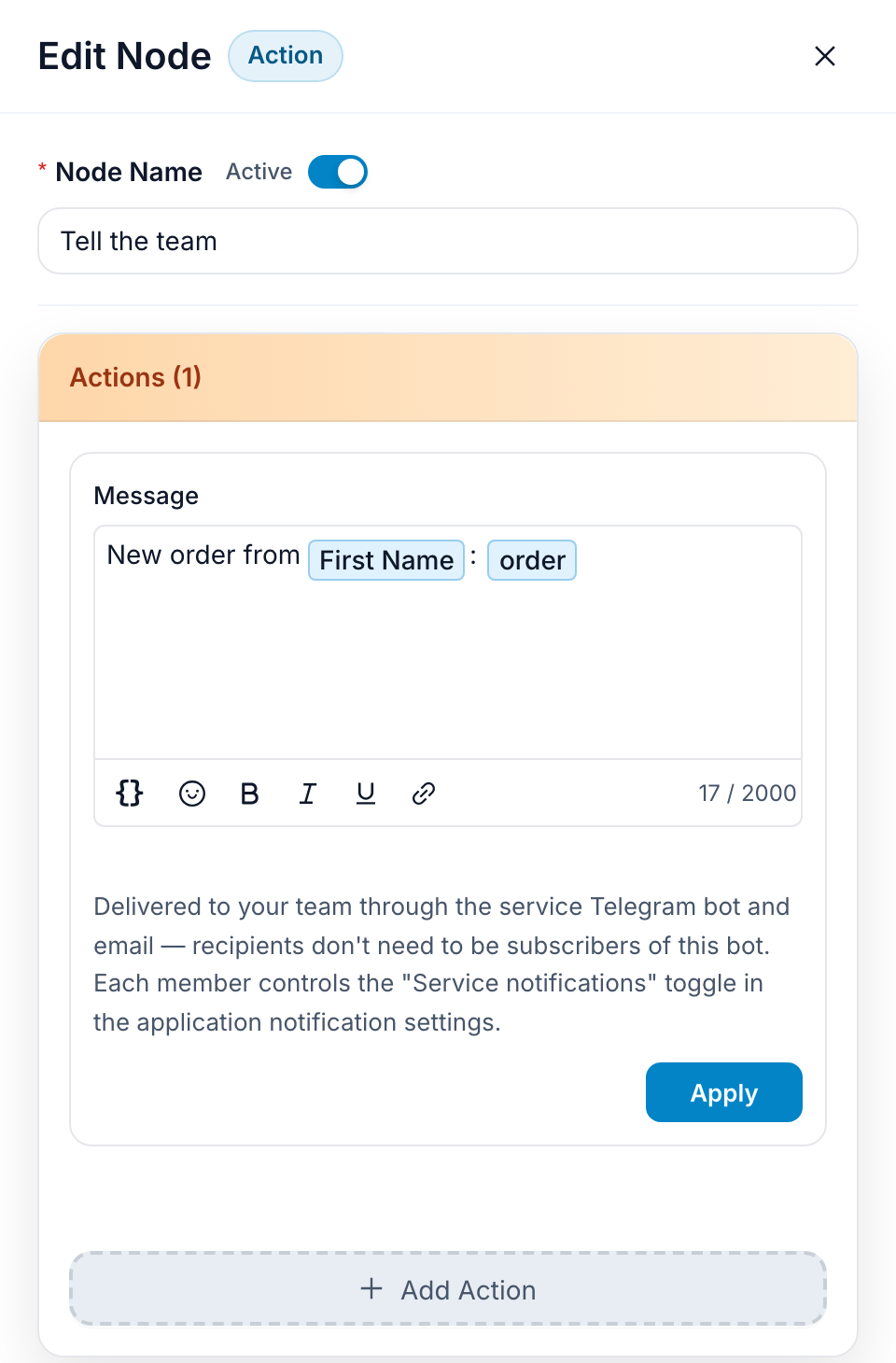
5. Test before anyone sees it. Click Test on the toolbar. A preview chat opens where you talk to your bot like a customer would, without touching Telegram. Go through every button. Leave a request with a deliberately wrong phone number and check that the bot asks again.

6. Publish. Click Deploy, choose Telegram, paste the token from BotFather and click Connect & publish. Then open your bot in Telegram and send /start.

One detail about menus. Telegram has two kinds: buttons under a message, which you built above, and the Menu list of commands next to the text field. You do not have to set up the second one in BotFather: when you publish, FlowCastle adds every flow that starts with a command, such as /prices, to that list.
What is free and what costs money
Telegram charges nothing for bots. BotFather is free, and so is the token.
On FlowCastle's free plan you get:
- 2,000 automation events a month. An event is a message or a button tap from a person. A person's very first message is never counted, and nothing the bot does in reply counts: messages, buttons, conditions and requests to your own systems are all free.
- 1,000 broadcast messages a month, counted per delivered recipient.
- 100 AI credits a month. They are spent when AI answers people or drafts a flow for you. A fast model uses half a credit per answer, so that is about 200 answers.
- Unlimited bots, flows and contacts.
The limit to know about: on the free plan, the bot's first message ends with a short line saying it runs on FlowCastle. Paid plans start at $9 a month, raise the limits and let you turn that line off.
With code, the software is free but the server is not. You pay for hosting every month, plus your own time to keep it running.
Common beginner mistakes
Saving is not publishing. Changes on the canvas do not reach Telegram until you click Deploy. This is the most common "my bot didn't change" question.
One token, two services. If you connect the same token to two builders or to a script and a builder, only one of them receives messages. Disconnect the old one, or create a second bot for experiments.
Expecting the bot to write first. It can only message people who pressed Start. Plan where the link to your bot will live: your website, Instagram bio, a QR code at the counter.
A wall of text instead of buttons. In a chat, people tap rather than read. Keep messages to two or three lines and move choices into buttons.
No way to reach a human. Always leave a button like Talk to a person. A bot that traps people costs you more customers than no bot at all.
Leaking the token. It happens on screenshots more often than you think. If it leaks, get a new one with /token.
What to build next
Once the first bot works, pick the version that matches your business:
- A bot that collects requests: questions with buttons, answers saved to the contact, and your team notified. The full walkthrough is in Build a Lead Bot in Telegram in 10 Minutes.
- An appointment booking bot for salons, clinics and tutors.
- A shop bot that takes payment inside Telegram.
- A support bot with AI answers from your knowledge base and a handoff to a person. If you want AI in your bot, start with the AI support bot guide.
The fastest start is the Telegram Lead Qualification template: a welcome, three questions with buttons, answers saved to the contact, and a notification to your team. Install it, change the questions to your own, connect the token and publish.