
Telegram is where your customers write. Someone asks about the price on Tuesday. You plan to answer after lunch. By Friday the chat is twenty rows down, and the person has bought from someone else.
With 20 chats you remember everyone. With 200 you don't, and pinning chats or sorting them into folders doesn't fix it. This article is about that problem: why Telegram loses leads, what people usually do about it, and the CRM for Telegram we built into FlowCastle to deal with it.
A note first: FlowCastle is our product, so we are not neutral. That's why the article ends with the cases where you should pick a different tool.
The short answer: a useful CRM for Telegram answers one question every morning: who is waiting for me right now? And it answers it without you copying chats anywhere.
Why leads get lost in Telegram
Telegram sorts chats by the last message. That works for talking to friends. For sales it's the wrong order, because what matters is whose turn it is. A chat where you replied last looks the same as a chat where the customer has been waiting for two days. And once you open a chat, the unread badge is gone, so the reminder is gone too.
A bot makes it worse. Every /start, every menu tap and every answer to a bot question lands in the same list. One real question from a customer gets lost among them.
Some people never write at all. They start your bot, pick a course and stop before paying. There is no chat to forget, because nobody typed anything. These are often the easiest sales you never make.
The usual fixes, and where they break
A spreadsheet or a Notion board. It works for a week. Then you skip updating it after a busy day, and the table stops matching reality. It's a copy of the conversation, and copies go out of date.
A separate sales CRM with a Telegram integration, like Kommo (amoCRM), Bitrix24 or HubSpot. This is the strongest option if your team sells in many places: deals with amounts, phone calls, email, a large set of integrations. If your sales team already works in one of them, stay there. The weak spots: your bot usually runs in another tool, so the CRM sees the messages but not what the person did inside the bot. You pay per seat. And you keep two systems in sync.
A CRM inside the platform that runs your bot. It knows every step a person took in the bot, because it's the same system. The weak spot: it is not a full sales CRM. There are no deal amounts and no phone calls.
The CRM in FlowCastle is the third kind. Here is what it does about each of the problems above.
"Who is waiting for my reply?"
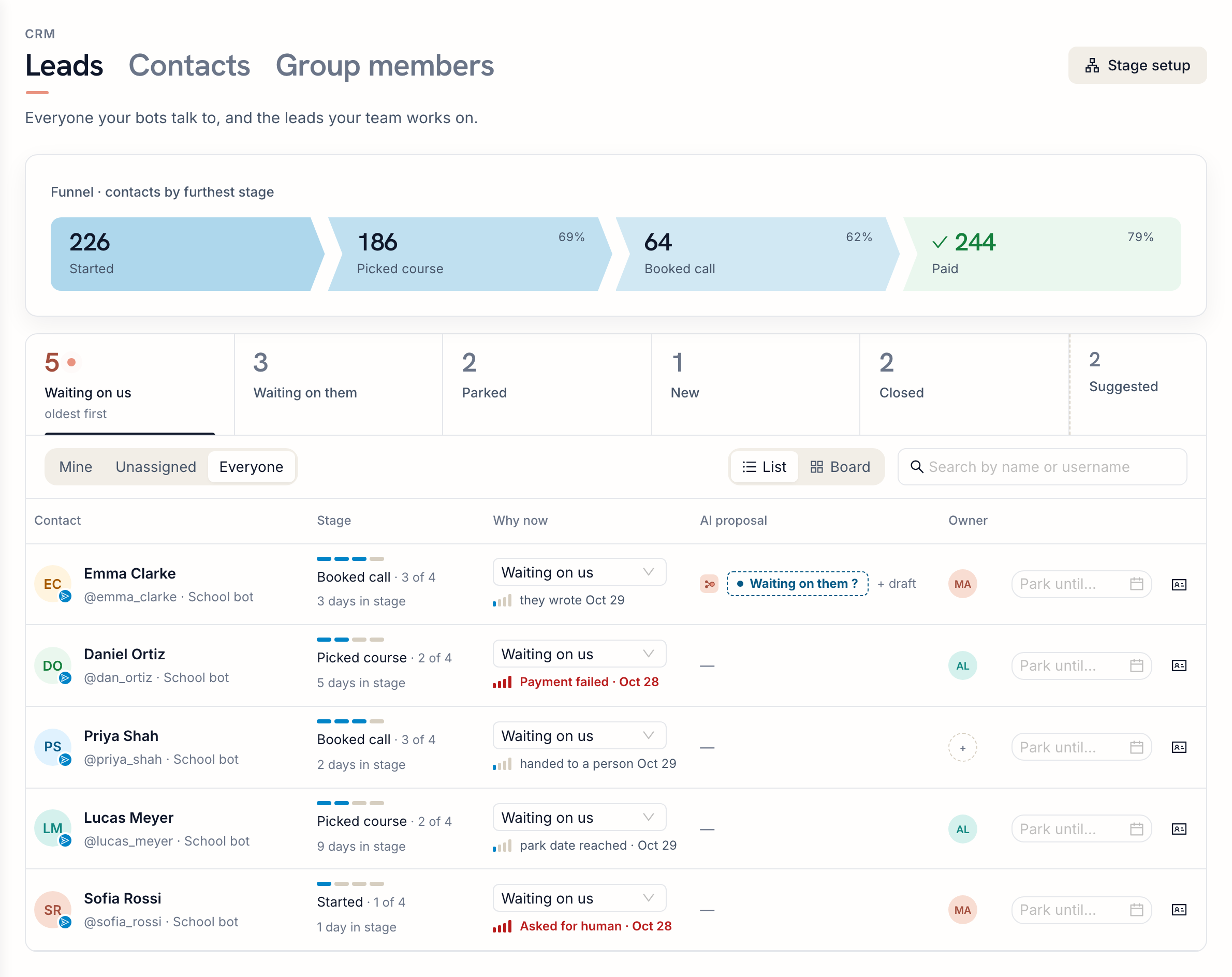
Open CRM → Leads. The first tab, Waiting on us, lists the people you owe an answer, oldest first.
You don't move people there by hand. The status follows the conversation:
- the person types a message: Waiting on us;
- someone on your team replies: Waiting on them;
- your bot hands the person over to a human: Waiting on us.
Only messages the person types count. Menu taps, /start and answers to your bot's questions don't move anyone. So the list holds real questions, not bot traffic.
Each row also says why the person is there: "they wrote Oct 29", "Payment failed", "Asked for human", "park date reached". In the screenshot, Daniel's payment failed yesterday. That's worth knowing before you write to him.
"They went quiet and I forgot"
After you reply, the lead moves to Waiting on them, with the quietest first. "Quiet 4 days" is your cue to follow up.
Some people say "write to me after the 10th". For them there is Parked. Pick a date, and on that day the lead comes back to Waiting on us by itself. You don't need a reminder app or a note in your calendar.
There is also a morning digest. At 09:00 your time, the FlowCastle notification bot sends you up to five people to reach today, right in Telegram. Each one comes with Open and Skip buttons, plus Approve & send when a draft reply is ready.
"People stop halfway through the bot, and nobody notices"
Your bot can mark key steps as goals with the Set Analytics Goal step: started, picked a course, booked a call, paid. FlowCastle looks at the order in which people reach those goals and turns them into funnel stages. You don't have to draw a sales pipeline by hand.
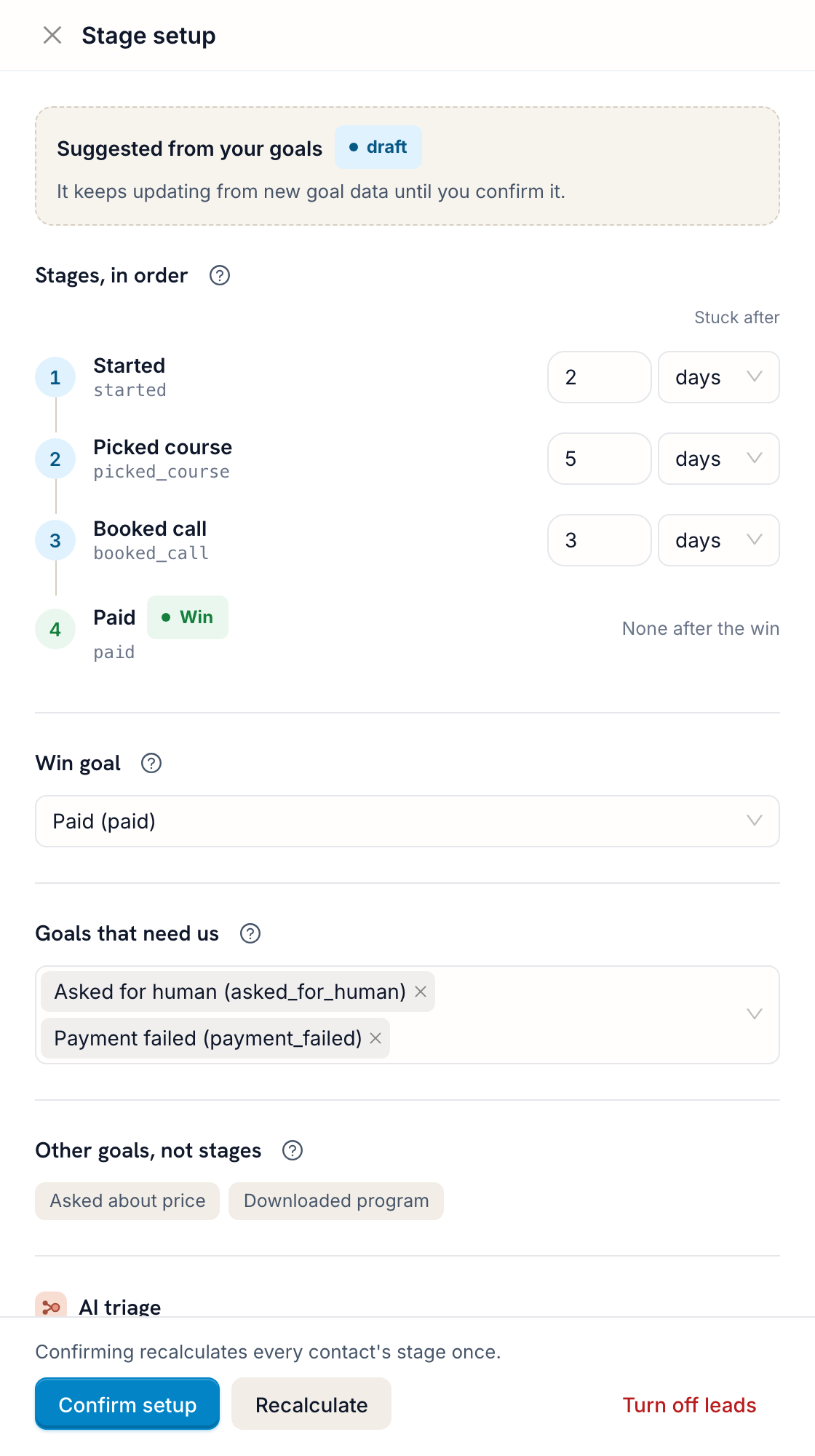
It also works out how long people usually stay at each stage. Say 9 out of 10 people move on from "Picked course" within 5 days. Then someone who has been there for 11 days is stuck, and they show up in the Suggested tab.
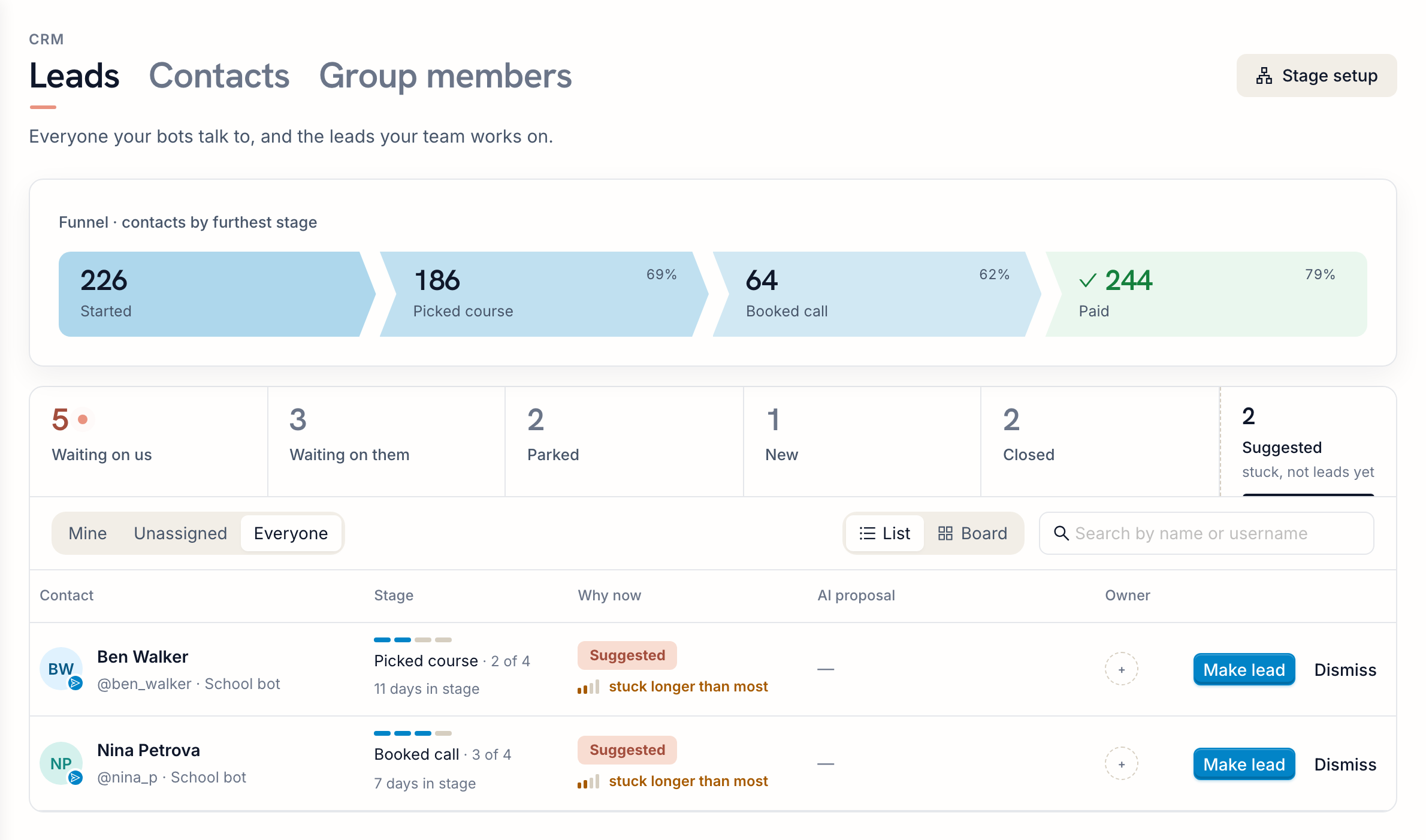
These people never wrote anything, so no chat list would show them. Make lead puts them into your queue. Dismiss hides them until they do something new.
The funnel at the top of the page shows how many people are at each stage right now. Click a stage to see only those people.
"I have to reread the whole chat to remember what we agreed"
Click a lead to open the contact card. The Lead tab shows the stage, the status, the owner, your team's notes and every change in the history.
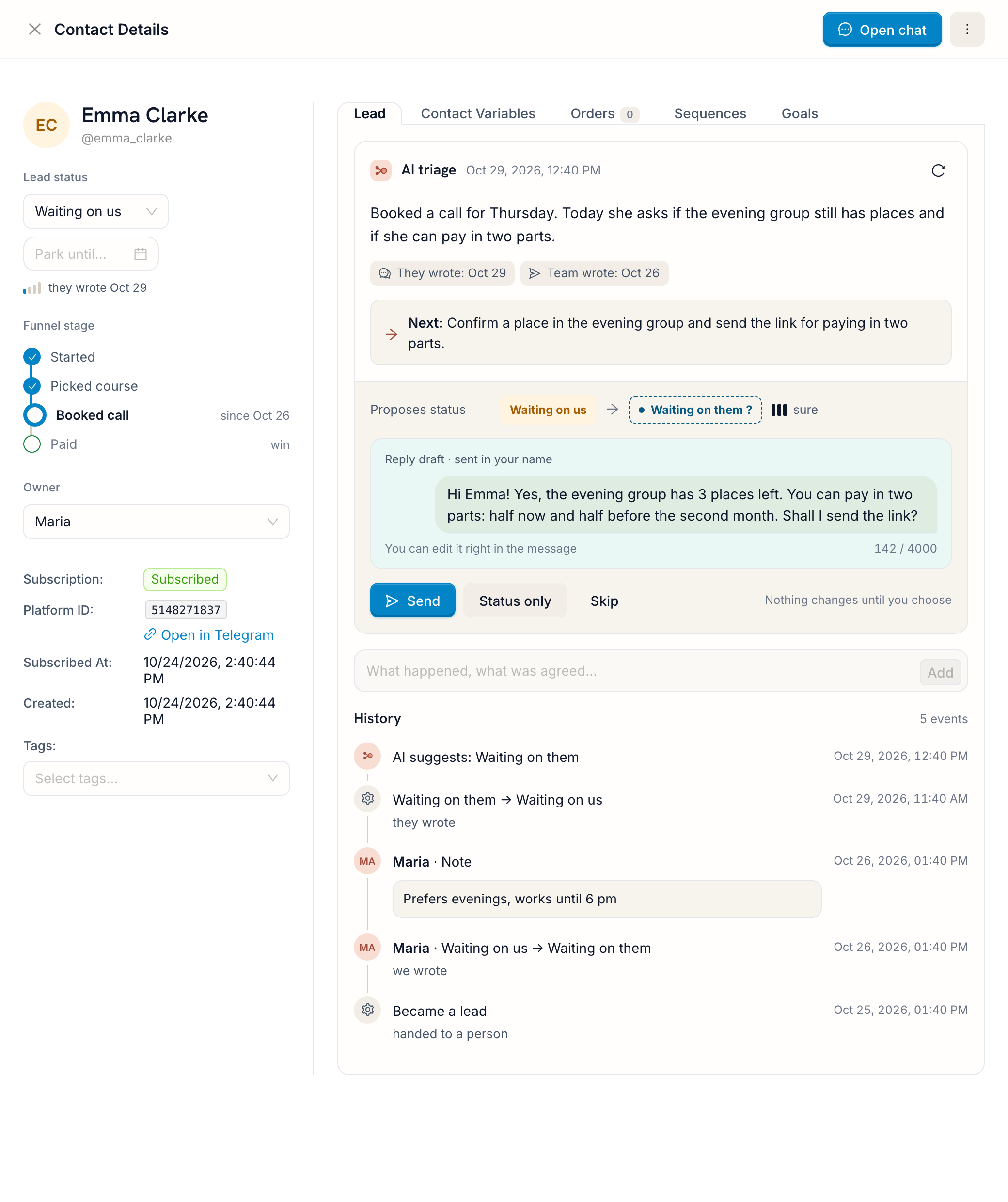
If you turn on AI triage, the card also has a short summary of where things stand, the next step and a draft reply in the language of the conversation. In the example, Emma asked about places in the evening group and about paying in two parts. The draft answers both.
AI triage only suggests. Nothing is sent until someone presses Send, and you can edit the draft first. You can also apply just the status, or skip the suggestion. AI triage is off by default. It uses AI credits, and you set a daily limit (50 checks a day unless you change it).
Open chat at the top of the card opens the conversation right there, so you can reply without leaving the list. It's the same live chat your team already uses.
"Who on the team is handling this one?"
Each lead has one owner. By default it's the person who made them a lead or who first replied to them in Live Chat. If you assign the chat to someone in Live Chat, the owner changes with it. The Mine / Unassigned / Everyone filter shows your own leads, the ones nobody has taken yet, or all of them.
For a view of the whole team's work, switch to Board. The same groups become columns. Drag a card to change its status. Drop it on Parked and it asks for a date. Drop it on Closed and it asks whether the lead was won or lost.
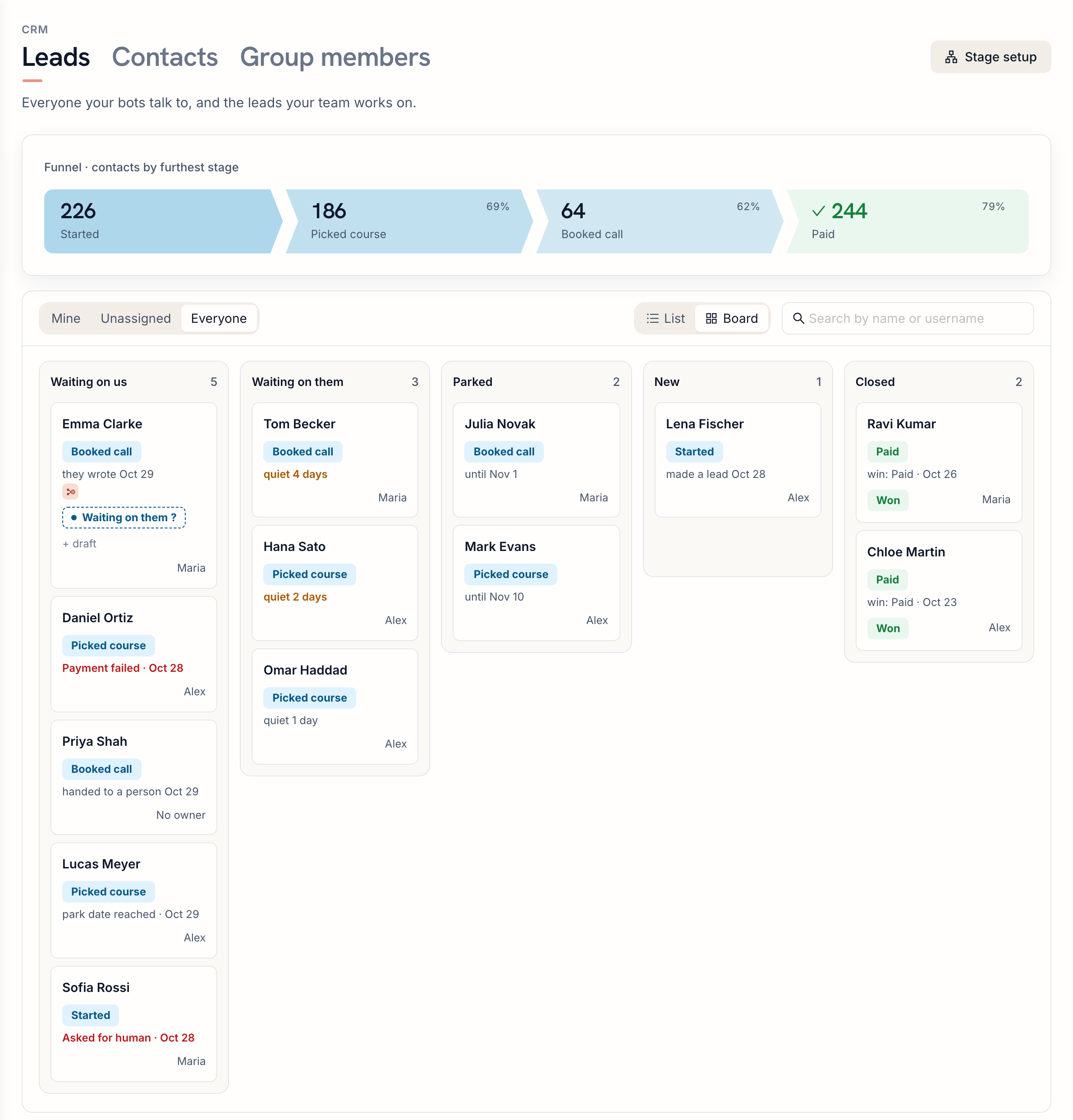
When the bot records your win goal (here it's "paid"), the lead is marked Won by itself.
Let AI answer the simple questions
Some questions never need to reach your team. An AI support step in the bot answers questions about prices, delivery or schedules from your knowledge base, and hands the chat to a person when it can't help. That lead goes straight to Waiting on us, with the whole conversation. Our guide to the AI support bot shows how to set it up.
When to pick something else
- You need deals with amounts, invoices, phone calls and email in one place. A sales CRM like Kommo, Bitrix24 or HubSpot fits better. You can keep it and connect it to the bot without code, and if there is no ready-made module for it yet, message our support and we will add one for free.
- Your bot runs on another builder and you don't want to move it. This CRM works with bots built in FlowCastle and with bots in code connected through our SDK.
- You want a flow step that sets a lead status. There is no such step yet. The bot moves leads through goals instead.
- You want to track groups and channels as leads. Only people can be leads.
One more detail: on Telegram, a tap on a reply-keyboard button arrives as an ordinary typed message, so it counts as one. Inline buttons don't. And for bots connected through the SDK, every message counts, including /start.
How to start
- Open CRM in the left menu and switch to Leads.
- Press Turn on leads. You need to be an owner or admin of the workspace.
- If your bot doesn't record goals yet, add a Set Analytics Goal step at the key points. A goal becomes a stage once at least 10 people have reached it.
- If you want AI summaries and drafts, turn on AI triage in Stage setup.
The Telegram CRM page shows the ways to start: build a bot in the no-code editor, keep a bot in code with the SDK, or ask us to move your bot from another builder. Don't have a bot that collects leads yet? Our guide to building a lead bot in Telegram walks you through one. All statuses and rules are described in the Leads documentation.